2026-09-10T14:01:54.236-04:00
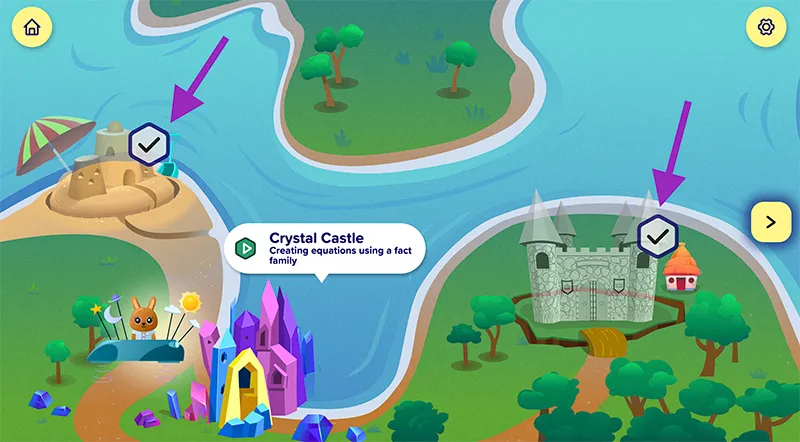
prek12 What's New <p><span class="text-white"><b><span class="fs-5">Grades 3–12</span></b></span></p> <h1><span class="text-white">What's New</span></h1> <h2><b>K–12: What's new in <i>ALEKS</i></b></h2> <p>Just like you, our solutions are always evolving to stay ahead of the curve. Take a look at the latest updates and enhancements to <i>ALEKS</i>, all designed to meet the needs of students, educators, and leaders.</p> <p><i><b><span class="fs-5">ALEKS</span></b></i></p> Select a Release Date ALEKS Updates for November 2025 ALEKS Updates for November 2025 ALEKS Updates for June 2025 ALEKS Updates for June 2025 ALEKS Updates for May 2025 ALEKS Updates for May 2025 ALEKS Updates for December 2024 ALEKS Updates for December 2024 ALEKS Updates for June 2024 ALEKS Updates for June 2024 ALEKS updates for June 2023 ALEKS updates for June 2023 ALEKS updates for April 2023 ALEKS updates for April 2023 ALEKS updates for December 2022 ALEKS updates for December 2022 ALEKS updates for June 2022 ALEKS updates for June 2022 <p><i><b><span class="fs-5">ALEKS Adventure</span></b></i></p> Select a Release Date ALEKS Adventure Updates for November 2025 ALEKS Adventure Updates for November 2025 ALEKS Adventure Updates for June 2025 ALEKS Adventure Updates for June 2025 ALEKS Adventure Updates for April 2025 ALEKS Adventure Updates for April 2025 ALEKS Adventure updates for December 2024 ALEKS Adventure updates for December 2024 <h2><b><i>ALEKS </i>Updates</b></h2> <h2><b><i>ALEKS </i>Updates</b></h2> <p>First accordion item</p> <p><b><span class="fs-5">Drag and Drop Topics into Modules</span></b></p> <p>Editing modules got a whole lot easier! You can now select topics and move them by using the <b>Move Up</b>, <b>Move Down</b>, or <b>Move To</b> buttons in the Module List or simply drag and drop them into another module. You can also re-order entire modules this way. <i>Modules are an optional setting to direct students’ learning in the personalized path by grouping ALEKS Pie topics.</i></p> Watch video to see how to drag and drop topics into modules Watch video to see how to drag and drop topics into modules Watch Video <p><b><span class="fs-5">Introducing the <i>ALEKS </i>Community</span></b></p> <p>The <i>ALEKS </i>Community is a free online hub packed with opportunities for educators to share ideas and get inspired – all while learning how to make the most out of <i>ALEKS</i>. Join and follow the community to access timely tips, resources, and videos, and learn and share insights with fellow educators using <i>ALEKS</i>. </p> <p><a href="https://communities.mheducation.com/registrations/groups/118446" target="_blank">Join the <i>ALEKS </i>Community</a><br> <a href="https://www.mheducation.com/unitas/school/explore/sites/aleks/aleks-community-flyer.pdf" target="_blank">Learn more about the <i>ALEKS </i>Community</a></p> <p><b><span class="fs-5">Shorter Initial Knowledge Check</span></b></p> <p>Reduce test fatigue with a shorter Initial Knowledge Check in select elementary and middle school courses. Thanks to enhanced AI, it has fewer questions while maintaining the results’ accuracy. Elementary courses (LV3-5) have a maximum of 15 questions; middle school courses (Middle School Math Course 1-3, Focus on Middle School Foundations 1-2, Essentials for Algebra, and Algebra Readiness) have a maximum of 20 questions. Students can start learning new content sooner, and you can more quickly identify their areas of need and plan instruction.</p> <p><a href="https://medium.com/inspired-ideas-prek-12/how-deep-learning-techniques-are-transforming-ed-tech-35b547feffb1" target="_blank">Read more about <i>ALEKS</i>' AI</a></p> <p><b><span class="fs-5">Organize Assignment List with Folders</span></b></p> <p>Stay organized and quickly locate assignments by creating folders in the class Assignment List and ordering assignments or folders by dragging and dropping them in place. Your customized list applies to students, ensuring both your view and students' view of the Assignment List reflects class routines and priorities.</p> Watch video to Organize Assignment List with Folders Watch video to Organize Assignment List with Folders Watch Video <p><b><span class="fs-5">Streamlined Course Recommendations</span></b></p> <p>Confidently enroll students in the course where they can be successful with updated recommendations that clearly suggest the best <i>ALEKS </i>course for students working at grade-level and students who are approaching grade-level.</p> <p><a title="See recommendations for Streamlined Courses" href="https://www.aleks.com/k12/course_products/recommendations_pop.html" target="_blank" data-layer-subarea="body" data-layer-label="See recommendations for Streamlined Courses">See Recommendations</a></p> <p><i>Please use these as guidelines. Schools, classes, and students with unique needs may fall outside these recommendations.</i></p> <p><b><span class="fs-5">Assign Master Templates in Access Manager</span></b></p> <p>Master Templates allow administrators to customize and control the content, settings, and assignments in an <i>ALEKS </i>class for use across their district. Organization administrators can assign district-level <i>ALEKS </i>Master Templates directly in Access Manager, so teachers and students get the customized, Master Template-based version of the class as soon as it's provisioned. Teachers can spend less time setting up linked classes and more time focusing on students' needs.</p> <p><a href="https://mh.my.site.com/DTS/s/article/ALEKS-Master-Templates-on-Access-Manager?dc=District_Administrators_Admin_Reportin" target="_blank" title="Download guide to Assign Master Templates in Access Manager" data-layer-subarea="body" data-layer-label="Download guide to Assign Master Templates in Access Manager">Download Guide</a></p> <p><b><span class="fs-5">Updated Math Content for Grades 6–10</span></b></p> <p>Middle and high school courses were updated with new topics that align to state standards. With more opportunity for students to practice and master math standards in <i>ALEKS</i>, you can more precisely monitor students’ progress toward standards proficiency. </p> <p><b><i>ALEKS </i>Topics:</b> 11 new topics covering linear equations, absolute value inequalities, lines, drawing graphs to fit a narrative, modeling bivariate data, and more. <i>ALEKS </i>Pies will automatically update with the topics that align to state standards based on locale. </p> line graph showing example of ALEKS topics Click to view larger image View example of ALEKS topic View example of ALEKS topic View Example <p><b>Assignment topics</b>: Fill gaps and extend coverage of standards with a new type of topic available to add to Homework, Test, or Quiz assignments. These topics are not included in the <i>ALEKS </i>Pie but can be easily located in the Assignment question picker, nested under each standard and indicated with a label </p> line graph showing example of ALEKS topics Click to view larger image View example of Assignment topic View example of Assignment topic View Example <p><b><span class="fs-5">Introducing <i>ALEKS Adventure</i></span></b></p> <p>Foster a love of math in every elementary student with <i>ALEKS Adventure</i>, an all-new solution driving playful, personalized learning. This age-appropriate and self-guided program lets students play the main character as they learn and master critical math skills on a colorful map. Together with canine companion Digit, students unlock and explore themed worlds that break math concepts down into bite-sized topics. <i>Grades 1 and 2 available now; Grades K and 3 available 2025.</i> </p> Watch video Introducing ALEKS Adventure Watch video Introducing ALEKS Adventure Watch Video <p><a href="/content/mheducation/us/en/gb/en/prek-12/program/microsites/MKTSP-GAB02M0/browse/adventure.html" target="_self" title="Learn more about ALEKS Adventure" data-layer-subarea="body" data-layer-label="Learn more about ALEKS Adventure">Learn More</a></p> <p><b><span class="fs-5">Standards-based Pies for all 50 States</span></b></p> <p>Ensure students are making progress toward standards proficiency with automatic standards-aligned <i>ALEKS </i>Pies for all 50 states. During class creation, <i>ALEKS </i>will custom-align the <i>ALEKS </i>Pie content to your states’ standards – no content editor or extra steps required!</p> <p><i>*Available for most ALEKS courses including LV3-5, Middle School Course 1-3, Pre-Algebra, Algebra 1, Geometry, Algebra 2, and Integrated Math 1-3.</i></p> <p><b><span class="fs-5">Enhanced Standards Reporting</span></b></p> <p>The class-level Standards report has improved visuals and more settings to support standards-based teaching and grading. See growth and progress in each domain at-a-glance, or drill down to a standard to see class and student progress in the individual skills for the standard. Optionally include students’ data from homework, tests, and quizzes in the report for a holistic view of standards progress based on all work in <i>ALEKS</i>. </p> <p><a title="Download Guide for enhanced standards reporting" href="https://www.mheducation.com/unitas/school/explore/sites/aleks/standards-reports.pdf" target="_blank" data-layer-subarea="body" data-layer-label="Download Guide for enhanced standards reporting">Download Guide</a></p> <p><b><span class="fs-5">Completion Time Estimates</span></b></p> <p>Predict how long students will take to complete modules or assignments with a Total Estimated Time that updates as you add topics. In the picker, time estimates for individual topics help gauge the complexity or difficulty of the topic. These estimates help ensure you are assigning an appropriate workload for students. </p> Click to view larger image View Example of Completion Time Estimates View Example of Completion Time Estimates View Example <p><b><span class="fs-5">Updated Math Tools and Content for Grades 6–10</span></b></p> <p>Middle and high school courses were updated with new topics and tools that expand coverage of state standards and help students develop conceptual understanding, apply skills in context, and engage with concrete models and hands-on practice. Updated topic areas include proportions and percents, real numbers, graphing and equations of lines, and quadratic functions. New interactive tools include a double number line, tape diagram, integer chips, and adding/subtracting on a number line. </p> Click to view larger image View example of Update for Math Tools and Content, Grades 6-10 View example of Update for Math Tools and Content, Grades 6-10 View Example <p><strong><span class="fs-5">AI Update Reduces Time in Knowledge Checks</span></strong></p> <p>Using deep learning neural networks, a form of machine learning that resembles the human brain, <em>ALEKS</em>’ AI has reduced students’ time spent in Knowledge Checks by more than 20%, allowing students more time to learn and master new topics. Research comparing student learning before and after the neural network AI update shows that students now master 9% more course material in the same amount of time.</p> <p><a href="/content/mheducation/us/en/about-us/news-insights/press-releases/new-ai-enhancement-to-mcgraw-hill-aleks.html" target="_self" title="See Press Release for AI Update Reduces Time in Knowledge Checks" data-layer-subarea="body" data-layer-label="See Press Releasse for AI Update Reduces Time in Knowledge Checks">See Press Release</a><br> </p> <p><a href="https://medium.com/inspired-ideas-prek-12/how-deep-learning-techniques-are-transforming-ed-tech-35b547feffb1" target="_blank" title="Read Blog for AI Update Reduces Time in Knowledge Checks" data-layer-subarea="body" data-layer-label="Read Blog for AI Update Reduces Time in Knowledge Checks">Read Blog</a></p> <p><b><span class="fs-5">Activity Time Breakdown for Class/Students</span></b></p> <p>The Activity Time Breakdown report shows class and students’ overall student time spent in Learning Mode, Knowledge Checks, Assignments, and QuickTables, so you can determine if students’ time in <i>ALEKS </i>aligns to your expectations and supports learning goals. Check the dashboard tile on the home page for a quick look or view the full report for details on each class and student.</p> Click to view larger image Watch video for Activity time breakdown for class/students Watch video for Activity time breakdown for class/students Watch Video <p><b><span class="fs-5">Individualized Pacing Goals</span></b></p> <p>To support students’ unique learning needs and IEPs, set pacing goal assignments for an individual student or group of students. Goals can be assigned for time in <i>ALEKS</i>, topics learned, or Pie Progress achieved. With individualized goals you can set appropriate, attainable targets that ensure each student is motivated to learn and make progress in <i>ALEKS</i>.</p> Click to view larger image View example of Individualized Pacing Goals View example of Individualized Pacing Goals View Example <p><b><span class="fs-5">Create your Own Questions</span></b></p> <p>Create your own questions to include in <i>ALEKS </i>assignments to address precise skills, extend standards, assign higher DoK or thought questions, or deliver common exams. Questions can be multiple choice, matching, numeric entry, or free response format and are auto-graded and included in the Assignment Report item analysis for at-a-glance performance monitoring. <b></b></p> Click to view larger image Watch video for creating your own questions Watch video for creating your own questions Watch Video <p><b><span class="fs-5">Course Placement Check</span></b></p> <p>Available for middle school and high school courses, the Course Placement Check reduces guess-work by recommending which <i>ALEKS </i>course students should start in for the best learning experience. </p> <p><span><a href="https://www.mheducation.com/unitas/school/explore/sites/aleks/getting-started-tutorial-aleks-course-placement-check.pdf" target="_blank" title="Download guide for Course Placement check" data-layer-subarea="body" data-layer-label="Download guide for Course Placement check">Download Guide</a></span></p> Click to view larger image Watch Video for course placement check Watch Video for course placement check Watch Video <p><b><span class="fs-5">Focus on Foundations Courses</span></b></p> <p>Designed especially for middle school and high school students who are approaching level, these courses prepare students to advance as quickly as possible into their grade-level middle school or high school course. These courses may be recommended by the Course Placement Check.</p> <p><b><span class="fs-5">Expanded Reports for Administrators</span></b></p> <p>Administrators can more easily track usage and progress across their district or school with four new dashboard tiles: Pie Progress, Learning Rate, Activity Time, and Activity Time Breakdown. From the tile’s corresponding reports, easily zoom in on a specific school, course, master template, teacher or class. At-a-glance access to this data helps administrators determine if <i>ALEKS </i>is being used with fidelity and supporting learning goals. </p> Click to view larger image View Examples of Expanded Reports for Administrators View Examples of Expanded Reports for Administrators View Examples of Pie Progress and Learning Rate Tiles <p>View Examples of Pie Progress and<br> Learning Rate Tiles ></p> Click to view larger image View Examples of Expanded Reports for Administrators View Examples of Expanded Reports for Administrators View Example of Pie Progress Chart <p><b><span class="fs-5"><i>ALEKS </i>Pie Design and Accessibility </span></b></p> <p>Students' view of the <i>ALEKS </i>Pie features a refreshed design that enhances accessibility with improved color contrast, textures, and labels. These updates are compatible with screen readers and maintain the functionality of the <i>ALEKS </i>Pie for students. </p> Watch video to see how to drag and drop topics into modules View Example of ALEKS Pie Design and Accessibility View Example <p><b><span class="fs-5">More Choice and Support for Difficult Topics</span></b></p> <p>When students repeatedly answer a topic incorrectly in their adaptive path, they now see an explanation with the correct answer and buttons to <b>Work on Something Else</b> or <b>Try Again</b>. With the option to persist through the current topic or switch to a new topic, students can exercise choice in their learning and have more opportunities to succeed.</p> Watch video to see how to drag and drop topics into modules View Example of More Choice and Support for Difficult Topics View Example <p><b><span class="fs-5">Approaching Grade Level Courses: Middle School</span></b></p> <p>The former <i><b>RtI </b></i>and <b><i>Focus on Middle School Foundations</i></b> courses were consolidated and updated into one suite of courses for middle school students who are approaching grade level. These courses cover prior grade-level state standards to prepare students for the grade-level course and feature standards-based <i>ALEKS </i>Pies and reporting for all 50 states. The new, updated courses are:</p> <ul> <li>Middle School Math Course 1 Foundations/RtI 6 </li> <li>Middle School Math Course 2 Foundations/RtI 7 </li> <li>Middle School Math Course 3 Foundations/RtI 8</li> </ul> <p><b><span class="fs-5">Approaching Grade Level Courses: High School</span></b></p> <p>The former <b><i>Focus on High School Foundations</i></b> courses were updated and expanded into distinct preparation courses for high school Geometry, Algebra 2, and Integrated Math students who are approaching grade level. These new courses and the existing <b>High School Preparation for Algebra 1 </b>course all feature standards-based <i>ALEKS </i>Pies and reporting for all 50 states. The new, updated courses are:</p> <ul> <li>High School Preparation for Algebra 1 </li> <li>Preparation for High School Geometry </li> <li>Preparation for Algebra 2 </li> <li>Preparation for Integrated Mathematics </li> </ul> <p><b><span class="fs-5">Course Selection Guide for Educators</span></b></p> <p>This guide recommends which <i>ALEKS </i>course to use with on-grade level and approaching grade level students in each grade band and includes descriptions of each course. It also provides guidance for identifying students who should work in an approaching grade level course and advancing students to a higher course.</p> <p><a href="https://mh.my.site.com/DTS/s/article/ALEKS-K-12-Course-Recommendations?dc=Getting_Started_Teacher" target="_blank">View Guide</a></p> <p><b><span class="fs-5"><a>Teacher and Administrator Experience</a></span></b></p> <p>Administrators and teachers can try a new <i>ALEKS</i> view with updated visuals, streamlined dashboards and menus, and a centralized Help Center and Communication Center. Alongside familiar highlights like ALEKS Pie Progress and top Ready to Learn topics, the dashboard displays new features to support data-driven instruction, like a class activity feed and one-click student groups.</p> Take Tour <p><b><span class="fs-5">Shared Access Settings for Co-teachers</span></b></p> <p>To ensure compliance with district and school privacy requirements, co-teachers on a class can now be granted specific levels of access to the class, including full, read-only, or access-by-student. <i>These settings were already available in ALEKS via ALEKS.com and are now available on ALEKS via SSO/my.MHeducation.com</i></p> <p><b><span class="fs-5">Calculus</span></b></p> <p>With best-in-class digital content and tools, ALEKS Calculus supports mastery-based learning with an adaptive path and teacher choice of granular assignable questions for nearly unlimited practice. Content coverage for AP Calculus AB available now; coverage for AP Calculus BC available Fall 2026.</p> See Brochure June 2026 November 2025 June 2025 May 2025 December 2024 June 2024 (Back-to-School) June 2023 (Back-to-School) April 2023 December 2022 June 2022 <p><strong><span class="fs-5"><em>ALEKS </em>+ ProPL Assessment = Stronger Insights</span></strong></p> <p>Educators can pair Pearson Review of Progress & Learning (ProPL) fall, winter, and spring assessments with <em>ALEKS </em>to create a unified data experience connecting interim results with <em>ALEKS </em>learning and Knowledge Check data. ProPL measures student growth throughout the year, tracking within‑year progress, while <em>ALEKS </em>provides ongoing formative insights from daily adaptive learning. This enhancement helps educators track student growth, respond to learning needs sooner, and help students stay on pace for end‑of‑year assessments.</p> Learn more about ALEKS + ProPL Assessment Learn more about ALEKS + ProPL Assessment Learn More <p><b><span class="fs-5">Teacher + Administrator Experience</span></b></p> <p>For a more accessible and streamlined experience, teachers and administrators will launch directly into <b>New <i>ALEKS</i></b>, which now includes enhanced workflows for customizing class content and a fully supported, easy‑to‑use gradebook. <i>Classic ALEKS is still available and can be accessed at any time using the toggle.</i></p> Take Tour of Teacher plus Admin Experience Take a Tour of Teacher plus Admin Experience Take a Tour <p><b><span class="fs-5">Calculus Updates Expand AP Coverage</span></b></p> <p>Expanded Calculus coverage aligned to AP Calculus AB and BC standards features new topics on differential equations, parametric equations, sequences, and series. This update helps students strengthen conceptual understanding and exam readiness while giving teachers clearer insight into mastery and progress across AP units.</p> See AP Exam Alignment <p><strong><span class="fs-5"><a>Administrator Standards Report</a></span></strong></p> <p>Administrators can now create tailored reports to track districtwide progress in state standards for <em>ALEKS </em>and <em>ALEKS Adventure</em> courses. Easily monitor growth in your district’s priority standards, uncover trends, and spotlight classrooms or teachers who are excelling—or may need a little extra support.</p> <p><a title="Take Tour of ALEKS" href="https://hub.mheducation.com/share/ALEKSdistrictstandards" target="_blank" data-layer-subarea="body" data-layer-label="Take Tour of ALEKS under District Administrator Standards Report">Take Tour</a></p> <h2><b><i>ALEKS </i>Updates</b></h2> <h2><b><i>ALEKS Adventure </i>Updates</b></h2> <p>First accordion item</p> <p><b><span class="fs-5">More focus on ready-to-learn topics</span></b></p> <p>To focus students' attention on topics they are ready to learn and should work on next, already-completed topics are now collapsed on the map and labeled with a check mark. Clicking a check mark expands all the completed topics on the map until the page is re-loaded. Students may still review completed topics by clicking and re-playing them. </p> View Example of focus on ready-to-learn topics View Example of focus on ready-to-learn topics View Example <p><b><span class="fs-5">Hints include visual scaffolds</span></b></p> <p>When students click the Hint button, they now see a visual scaffold in addition to the written and spoken hint from Digit, helping them make connections and comprehend new or complex concepts.</p> View example of hints included in visual scaffolds View example of hints included in visual scaffolds View Example <p><b><span class="fs-5">Re-play read-aloud</span></b></p> <p>All topic pages now have a re-speak button so students can re-play the text-to-speech on demand. Clicking the re-speak button also re-plays any animations on the page.</p> Example of replay read-aloud Example of replay read-aloud View Example <p><b><span class="fs-5">More practice problems</span></b><span class="fs-5"></span></p> <p>Additional variations of independent practice problems have been added to all topics so students are less likely to encounter the same problem if they re-visit a topic or are working on the same one as a classmate.</p> <p><b><span class="fs-5">AI Update improves accuracy and choice</span></b></p> <p>Enhancements to <i>ALEKS Adventure’'</i> AI have increased the precision of the Initial Knowledge Check without adding more questions. Students will be more accurately placed in the course material and may have more ready-to-learn topics available on their maps, giving them more choices of what to learn. </p> <p><b><span class="fs-5">Shorter Initial Knowledge Check</span></b></p> <p>Reduce test fatigue with a shorter Initial Knowledge Check in select elementary and middle school courses. Thanks to enhanced AI, it has fewer questions while maintaining the results’ accuracy. Elementary courses (LV3-5) have a maximum of 15 questions; middle school courses (Middle School Math Course 1-3, Focus on Middle School Foundations 1-2, Essentials for Algebra, and Algebra Readiness) have a maximum of 20 questions. Students can start learning new content sooner, and you can more quickly identify their areas of need and plan instruction.</p> <p><a href="https://medium.com/inspired-ideas-prek-12/how-deep-learning-techniques-are-transforming-ed-tech-35b547feffb1" target="_blank">Read more about <i>ALEKS</i>' AI ></a></p> <p><b><span class="fs-5">Organize Assignment List with Folders</span></b></p> <p>Stay organized and quickly locate assignments by creating folders in the class Assignment List and ordering assignments or folders by dragging and dropping them in place. Your customized list applies to students, ensuring both your view and students' view of the Assignment List reflects class routines and priorities.</p> Watch video to Organize Assignment List with Folders Watch video to Organize Assignment List with Folders Watch Video > <p><b><span class="fs-5">Streamlined Course Recommendations</span></b></p> <p>Confidently enroll students in the course where they can be successful with updated recommendations that clearly suggest the best <i>ALEKS </i>course for students working at grade-level and students who are approaching grade-level.</p> <p><a title="See recommendations for Streamlined Courses" href="https://www.aleks.com/k12/course_products/recommendations_pop.html" target="_blank" data-layer-subarea="body" data-layer-label="See recommendations for Streamlined Courses">See Recommendations ></a></p> <p><i>Please use these as guidelines. Schools, classes, and students with unique needs may fall outside these recommendations.</i></p> <p><b><span class="fs-5">Assign Master Templates in Access Manager</span></b></p> <p>Master Templates allow administrators to customize and control the content, settings, and assignments in an <i>ALEKS </i>class for use across their district. Organization administrators can assign district-level <i>ALEKS </i>Master Templates directly in Access Manager, so teachers and students get the customized, Master Template-based version of the class as soon as it's provisioned. Teachers can spend less time setting up linked classes and more time focusing on students' needs.</p> <p><a href="https://mh.my.site.com/DTS/s/article/ALEKS-Master-Templates-on-Access-Manager?dc=District_Administrators_Admin_Reportin" target="_blank" title="Download guide to Assign Master Templates in Access Manager" data-layer-subarea="body" data-layer-label="Download guide to Assign Master Templates in Access Manager">Download Guide ></a></p> <p><b><span class="fs-5">Updated Math Content for Grades 6–10</span></b></p> <p>Middle and high school courses were updated with new topics that align to state standards. With more opportunity for students to practice and master math standards in <i>ALEKS</i>, you can more precisely monitor students’ progress toward standards proficiency. </p> <p><b><i>ALEKS </i>Topics:</b> 11 new topics covering linear equations, absolute value inequalities, lines, drawing graphs to fit a narrative, modeling bivariate data, and more. <i>ALEKS </i>Pies will automatically update with the topics that align to state standards based on locale. </p> line graph showing example of ALEKS topics Click to view larger image View example of ALEKS topic View example of ALEKS topic View Example > <p><b>Assignment topics</b>: Fill gaps and extend coverage of standards with a new type of topic available to add to Homework, Test, or Quiz assignments. These topics are not included in the <i>ALEKS </i>Pie but can be easily located in the Assignment question picker, nested under each standard and indicated with a label </p> line graph showing example of ALEKS topics Click to view larger image View example of Assignment topic View example of Assignment topic View Example > <p><b><span class="fs-5">Introducing <i>ALEKS Adventure</i></span></b></p> <p>Foster a love of math in every elementary student with <i>ALEKS Adventure</i>, an all-new solution driving playful, personalized learning. This age-appropriate and self-guided program lets students play the main character as they learn and master critical math skills on a colorful map. Together with canine companion Digit, students unlock and explore themed worlds that break math concepts down into bite-sized topics. <i>Grades 1 and 2 available now; Grades K and 3 available 2025.</i> </p> Watch video Introducing ALEKS Adventure Watch video Introducing ALEKS Adventure Watch Video > <p><a href="/content/prek-12/en_us/program/microsites/MKTSP-GAB02M0/adventure.html" target="_self" title="Learn more about ALEKS Adventure" data-layer-subarea="body" data-layer-label="Learn more about ALEKS Adventure">Learn More ></a></p> <p><b><span class="fs-5">Standards-based Pies for all 50 States</span></b></p> <p>Ensure students are making progress toward standards proficiency with automatic standards-aligned <i>ALEKS </i>Pies for all 50 states. During class creation, <i>ALEKS </i>will custom-align the <i>ALEKS </i>Pie content to your states’ standards – no content editor or extra steps required!</p> <p><i>*Available for most ALEKS courses including LV3-5, Middle School Course 1-3, Pre-Algebra, Algebra 1, Geometry, Algebra 2, and Integrated Math 1-3.</i></p> <p><b><span class="fs-5">Enhanced Standards Reporting</span></b></p> <p>The class-level Standards report has improved visuals and more settings to support standards-based teaching and grading. See growth and progress in each domain at-a-glance, or drill down to a standard to see class and student progress in the individual skills for the standard. Optionally include students’ data from homework, tests, and quizzes in the report for a holistic view of standards progress based on all work in <i>ALEKS</i>. </p> <p><a title="Download Guide for enhanced standards reporting" href="https://www.mheducation.com/unitas/school/explore/sites/aleks/standards-reports.pdf" target="_blank" data-layer-subarea="body" data-layer-label="Download Guide for enhanced standards reporting">Download Guide > </a></p> <p><b><span class="fs-5">Completion Time Estimates</span></b></p> <p>Predict how long students will take to complete modules or assignments with a Total Estimated Time that updates as you add topics. In the picker, time estimates for individual topics help gauge the complexity or difficulty of the topic. These estimates help ensure you are assigning an appropriate workload for students. </p> Click to view larger image View Example of Completion Time Estimates View Example of Completion Time Estimates View Example > <p><b><span class="fs-5">Updated Math Tools and Content for Grades 6–10</span></b></p> <p>Middle and high school courses were updated with new topics and tools that expand coverage of state standards and help students develop conceptual understanding, apply skills in context, and engage with concrete models and hands-on practice. Updated topic areas include proportions and percents, real numbers, graphing and equations of lines, and quadratic functions. New interactive tools include a double number line, tape diagram, integer chips, and adding/subtracting on a number line. </p> Click to view larger image View example of Update for Math Tools and Content, Grades 6-10 View example of Update for Math Tools and Content, Grades 6-10 View Example > <p><b><span class="fs-5">AI Update Reduces Time in Knowledge Checks</span></b></p> <p>Using deep learning neural networks, a form of machine learning that resembles the human brain, <i>ALEKS</i>’ AI has reduced students’ time spent in Knowledge Checks by more than 20%, allowing students more time to learn and master new topics. Research comparing student learning before and after the neural network AI update shows that students now master 9% more course material in the same amount of time. </p> <p><a href="/content/corp/en_us/news-insights/press-releases/new-ai-enhancement-to-mcgraw-hill-aleks.html" target="_self" title="See Press Releasse for AI Update Reduces Time in Knowledge Checks" data-layer-subarea="body" data-layer-label="See Press Releasse for AI Update Reduces Time in Knowledge Checks">See Press Release ></a><br> <a href="https://medium.com/inspired-ideas-prek-12/how-deep-learning-techniques-are-transforming-ed-tech-35b547feffb1" target="_blank" title="Read Blog for AI Update Reduces Time in Knowledge Checks" data-layer-subarea="body" data-layer-label="Read Blog for AI Update Reduces Time in Knowledge Checks">Read Blog ></a></p> <p><b><span class="fs-5">Activity Time Breakdown for Class/Students</span></b></p> <p>The Activity Time Breakdown report shows class and students’ overall student time spent in Learning Mode, Knowledge Checks, Assignments, and QuickTables, so you can determine if students’ time in <i>ALEKS </i>aligns to your expectations and supports learning goals. Check the dashboard tile on the home page for a quick look or view the full report for details on each class and student.</p> Click to view larger image Watch video for Activity time breakdown for class/students Watch video for Activity time breakdown for class/students Watch Video > <p><b><span class="fs-5">Individualized Pacing Goals</span></b></p> <p>To support students’ unique learning needs and IEPs, set pacing goal assignments for an individual student or group of students. Goals can be assigned for time in <i>ALEKS</i>, topics learned, or Pie Progress achieved. With individualized goals you can set appropriate, attainable targets that ensure each student is motivated to learn and make progress in <i>ALEKS</i>.</p> Click to view larger image View example of Individualized Pacing Goals View example of Individualized Pacing Goals View Example > <p><b><span class="fs-5">Create your Own Questions</span></b></p> <p>Create your own questions to include in <i>ALEKS </i>assignments to address precise skills, extend standards, assign higher DoK or thought questions, or deliver common exams. Questions can be multiple choice, matching, numeric entry, or free response format and are auto-graded and included in the Assignment Report item analysis for at-a-glance performance monitoring. <b></b></p> Click to view larger image Watch video for creating your own questions Watch video for creating your own questions Watch Video > <p><b><span class="fs-5">Course Placement Check</span></b></p> <p>Available for middle school and high school courses, the Course Placement Check reduces guess-work by recommending which <i>ALEKS </i>course students should start in for the best learning experience. </p> <span><a href="https://www.mheducation.com/unitas/school/explore/sites/aleks/getting-started-tutorial-aleks-course-placement-check.pdf" target="_blank" title="Download guide for Course Placement check" data-layer-subarea="body" data-layer-label="Download guide for Course Placement check">Download Guide ></a></span> Click to view larger image Watch Video for course placement check Watch Video for course placement check Watch Video > <p><b><span class="fs-5">Focus on Foundations Courses</span></b></p> <p>Designed especially for middle school and high school students who are approaching level, these courses prepare students to advance as quickly as possible into their grade-level middle school or high school course. These courses may be recommended by the Course Placement Check.</p> <p><b><span class="fs-5">Expanded Reports for Administrators</span></b></p> <p>Administrators can more easily track usage and progress across their district or school with four new dashboard tiles: Pie Progress, Learning Rate, Activity Time, and Activity Time Breakdown. From the tile’s corresponding reports, easily zoom in on a specific school, course, master template, teacher or class. At-a-glance access to this data helps administrators determine if <i>ALEKS </i>is being used with fidelity and supporting learning goals. </p> Click to view larger image View Examples of Expanded Reports for Administrators View Examples of Expanded Reports for Administrators View Examples of Pie Progress and Learning Rate Tiles > <p>View Examples of Pie Progress and<br> Learning Rate Tiles ></p> Click to view larger image View Examples of Expanded Reports for Administrators View Examples of Expanded Reports for Administrators View Example of Pie Progress Chart > <p><b><span class="fs-5">Review Mode at End of Grade Level</span></b></p> <p>When students reach the end of their grade level, they are guided to play or re-play topics for further practice and reinforcement. Early finishers can continue working productively in their current class with no action needed from the teacher. When balloons display on a student’s homepage, it means they’ve reached the end of the grade level and are now in review mode. As they review topics, they’ll earn rewards and take Progress Knowledge Checks and can increase their mastery percent by answering Progress Knowledge Check questions correctly. </p> View Example of focus on ready-to-learn topics View Example of focus on ready-to-learn topics View Example <p><b><span class="fs-5"><a>Kindergarten and Grade 3</a></span></b></p> <p>Grade-level, standards-aligned courses for kindergarten and grade 3 are now available! Combined with existing courses for grades 1 and 2, ALEKS Adventure now offers a seamless adaptive learning experience that engages students from K to 3.</p> Learn More <p><b><span class="fs-5">Prerequisite and enrichment topics</span></b></p> <p>Teachers can now add prerequisite and/or enrichment topics to any ALEKS Adventure course.* Adding prerequisite topics lets students fill prior grade level gaps; adding enrichment topics lets students access higher grade level content they are ready to learn. A subset of essential prerequisite topics is automatically included in grades 1-3. <i>*Prerequisite topics can be added to grades 1-3. Enrichment topics can be added to grades K-2.</i></p> <p><b><span class="fs-5">Fact Fluency Improvements</span></b></p> <p>Multiplication and Division mode is now available in fact fluency games and is the default for grade 3. Additionally, students can choose a new fact fluency game, <b>Starship Surfers,</b> when redeeming a post-topic reward or daily gameplay. Finally, teachers have a new Fact Fluency report to track students’ time and progress in the fact fluency games. </p> <p><b><span class="fs-5"><a>Student homepage updates</a></span></b></p> <p>The student homepage automatically hides maps without Ready to Learn topics, keeping students’ attention and focus on the math they should work on next. In grades K-2, a new toggle is available to display the corresponding ALEKS Pie slice and math name for each portal, helping teachers guide students to specific topics more easily.</p> <p><strong><span class="fs-5"><a>Just-in-time Review</a></span></strong></p> <p>To help students strengthen their understanding when they need it most, they will automatically be guided to re-play a topic for a quick, focused review if they struggle to recall that topic during a Progress Knowledge Check.</p> <p><a title="Read Article about ALEKS Adventure Just-in-time review" href="https://mh.my.site.com/DTS/s/article/Just-in-time-Review-after-a-Progress-Knowledge-Check" target="_blank" data-layer-subarea="body" data-layer-label="Read Article about ALEKS Adventure Just-in-time review">Read Article</a></p> <p><strong><span class="fs-5"><a>Introducing the <em>ALEKS Adventure</em> Community</a></span></strong></p> <p>The <em>ALEKS Adventure</em> Community is a free online hub packed with opportunities for educators to share ideas and get inspired – all while learning how to make the most out of <em>ALEKS Adventure</em>. Join and follow the community to access timely tips, resources, and videos, and learn and share insights with fellow educators. </p> <p><a href="https://communities.mheducation.com/registrations/groups/143890" target="_blank">Join the <em>ALEKS Adventure</em> Community</a></p> <p><a href="/content/dam/mhe/prek12/documents/programs/aleks/aleks-adventure-community-info.pdf" target="_blank">Learn more about the <em>ALEKS Adventure</em> Community</a></p> <p><b><span class="fs-5">Grade 4 and Grade 5</span></b></p> <p>New grade-level, standards aligned courses for Grades 4 and 5 complete students K–5 adaptive math journey with <i>ALEKS Adventure</i>. This expansion introduces new stories, themes, and age appropriate updates, like on demand read aloud and an older Digit the Dog voice, while deepening focus on meaningful math learning and mastery to prepare students for middle school success.</p> Tour Grades 4 and 5 Learn more about ALEKS + ProPL Assessment Tour Grades 4 and 5 <p><b><span class="fs-5"><i>ALEKS </i>Pie on Homepage</span></b></p> <p>All K–5 students can toggle on their homepage to see their <i>ALEKS </i>Pie, which provides an engaging visual of what they’ve accomplished and what they have left to learn. This update empowers young learners to track progress, celebrate achievements, and develop stronger ownership of their math journey. </p> <p><b><span class="fs-5">Kindergarten Fact Fluency</span></b></p> <p>Grade K games will focus exclusively on addition and subtraction, helping young learners build confidence and fluency with foundational math facts. This update keeps fact fluency practice fun, focused, and developmentally appropriate.</p> June 2026 November 2025 June 2025 April 2025 December 2024