illustrative-math
impact
5-steps-to-a-5-test-prep
networks
mh-social-studies
glencoe-science
corrective-reading
redbird
early-interventions-in-reading
spotlight-on-music
aleks
spelling-mastery
arrive-math
aleks-adventure
connecting-math-concepts
music-its-role
glencoe-math
2inform
actively-learn
achieve3000-literacy
wonders
redbird-math
my-math
ocr-foundational-skills-kit
reveal-math
Programs & Solutions
Programs & Solutions/Impact Social Studies
Programs & Solutions/Impact Social Studies/CA Impact 2019
Programs & Solutions/Reading Mastery
Programs & Solutions/Reading Mastery/SRA Reading Mastery Transformations
Programs & Solutions/Illustrative Math
Programs & Solutions/WonderWorks
Programs & Solutions/WonderWorks/WonderWorks 2022 & 2014
Context
Context/Subject
Context/Subject/Visual & Performing Arts
Programs & Solutions/Glencoe Math
Programs & Solutions/Glencoe Math/Glenoce Algebra 2 2018
Programs & Solutions/AP Edition
Programs & Solutions/AP Edition/AP Chemistry
Programs & Solutions/Wonders
Programs & Solutions/Wonders/Wonders Balanced Literacy 2016
Programs & Solutions/StudySync
Programs & Solutions/StudySync/StudySync 2015 & 2017
Context/Integration Type
Context/Integration Type/Direct Login & Auto-Rostering
Programs & Solutions/5 Steps to a 5 - AP Test Prep
Programs & Solutions/Level Up
Programs & Solutions/Level Up/Level Up 9–12
Programs & Solutions/McGraw Hill Math
Programs & Solutions/McGraw Hill Math/Texas Math
Programs & Solutions/Glencoe Math/Glencoe Math Accelerated
Business Unit
Business Unit/PreK-12
Programs & Solutions/Building Blocks
Programs & Solutions/Building Blocks/Building Blocks PreK 2025
Programs & Solutions/McGraw Hill CTE
Programs & Solutions/McGraw Hill CTE/CTE - Early Childhood Education
Programs & Solutions/McGraw Hill My Math
Programs & Solutions/McGraw Hill My Math/McGraw Hill My Math 2013 & 2016
Programs & Solutions/Wonders/Wonders 2023 2020 2017
Programs & Solutions/AP Edition/AP History & Geography
Programs & Solutions/Everyday Mathematics
Programs & Solutions/Everyday Mathematics/Everyday Mathematics 4 (K-6)
Programs & Solutions/Reading Laboratory
Programs & Solutions/Reading Laboratory/SRA Reading Laboratory 2025
Programs & Solutions/Networks
Programs & Solutions/Maravillas
Programs & Solutions/Maravillas/Maravillas 2020 & 2017
Programs & Solutions/World of Wonders
Programs & Solutions/World of Wonders/World of Wonders 2017
Programs & Solutions/McGraw Hill CTE/CTE - Computing and Technology
Programs & Solutions/McGraw Hill Social Studies
Programs & Solutions/Wonders/Wonders EL 2016
Programs & Solutions/McGraw Hill CTE/CTE - Criminal Justice
Programs & Solutions/McGraw Hill Literacy
Programs & Solutions/McGraw Hill Literacy/McGraw Hill Literacy Soar!
Programs & Solutions/Glencoe Health
Programs & Solutions/Glencoe Health/Glencoe Health 2022
Context/Subject/Social Studies
Support Topics
Support Topics/Tools & Product Integrations
Support Topics/Tools & Product Integrations/Access Manager
Programs & Solutions/Asi Se Dice
Programs & Solutions/Asi Se Dice/Asi se Dice 2016
Support Topics/User Guides & Account Management
Support Topics/User Guides & Account Management/User Management
Context/Education Level
Context/Education Level/Preschool
Programs & Solutions/Reveal Math (K-12)
Programs & Solutions/Reveal Math (K-12)/CA Reveal Math (K-12)
Programs & Solutions/Glencoe Science
Programs & Solutions/McGraw Hill Science
Programs & Solutions/McGraw Hill Science/TX Science 2025 (K-12)
Programs & Solutions/AP Edition/AP African American Studies
Programs & Solutions/Corrective Reading
Programs & Solutions/McGraw Hill Literacy/McGraw Hill Literacy Summit!
Programs & Solutions/Glencoe Science/Glencoe Science 2017
Context/Curriculum Type
Context/Curriculum Type/Core
Programs & Solutions/Glencoe Health/Glencoe Health 2014
Programs & Solutions/Number Worlds
Programs & Solutions/Number Worlds/Number Worlds 2024
Programs & Solutions/Redbird
Support Topics/User Guides & Account Management/Account Management
Context/Integration Type/SSO & Auto-Rostering
Programs & Solutions/Asi Se Dice/Asi se Dice 2024
Programs & Solutions/Open Court Reading
Programs & Solutions/Open Court Reading/OCR Word Analysis Kit
Programs & Solutions/Early Interventions in Reading
Programs & Solutions/All Sorts
Programs & Solutions/All Sorts/All Sorts 2026 (K-5)
Programs & Solutions/Number Worlds/Number Worlds 2015
Programs & Solutions/AP Edition/AP Language and Composition
Programs & Solutions/AP Edition/AP Statistics
Programs & Solutions/Networks/Networks 2014 (K-5)
Programs & Solutions/Spotlight on Music
Programs & Solutions/Building Blocks/Building Blocks 2024
Context/Curriculum Type/Supplemental
Programs & Solutions/Open Court Reading/Open Court Reading 2025
Programs & Solutions/Glencoe Math/Glencoe Algebra 1 2014
Programs & Solutions/ALEKS
Context/Education Level/High School
Programs & Solutions/Spelling Mastery
Programs & Solutions/AP Edition/AP Computer Science
Programs & Solutions/Teen Health
Programs & Solutions/Teen Health/Teen Health 2021
Programs & Solutions/AP Edition/AP Biology
Programs & Solutions/Glencoe Math/Glencoe Algebra 1 2018
Programs & Solutions/Networks/Networks 2018
Programs & Solutions/Arrive Math
Programs & Solutions/ALEKS Adventure
Programs & Solutions/Inspire Science
Programs & Solutions/Inspire Science/CA Inspire Science 2020
Programs & Solutions/Connecting Math Concepts
Context/Subject/Math
Programs & Solutions/Open Court Reading/Open Court Reading 2016, 2018, 2023
Asset Format Type
Asset Format Type/Customer Support
Programs & Solutions/Building Blocks/Building Blocks 2015
Programs & Solutions/Glencoe Math/Glencoe Algebra 2 2014
Programs & Solutions/Music! Its Role
Programs & Solutions/StudySync/StudySync 2021
Programs & Solutions/AP Edition/AP Music Theory
Context/Curriculum Type/Career & Technical Education
Programs & Solutions/McGraw Hill CTE/CTE - Business, Marketing, and Finance
Programs & Solutions/McGraw Hill Social Studies/FL Social Studies 2024 (K-12)
Programs & Solutions/iScience
Programs & Solutions/iScience/iScience 2017
Context/Subject/Health
Programs & Solutions/2Inform
Programs & Solutions/Wonders/Wonders 2014
Personas
Personas/School Educator
Personas/School Educator/School Administrator
Context/Subject/World Languages
Programs & Solutions/Level Up/Level Up 6–8
Context/Subject/Literacy
Programs & Solutions/McGraw Hill Pre-Algebra
Programs & Solutions/McGraw Hill Pre-Algebra/Pre-Algebra 2012
Context/Curriculum Type/Intervention
Programs & Solutions/AP Edition/AP Economics
Programs & Solutions/Level Up/Level Up K–5
Programs & Solutions/Inspire Science/Inspire Science 2020
Programs & Solutions/McGraw Hill Health
Programs & Solutions/McGraw Hill Health/McGraw Hill Health 2014
Programs & Solutions/McGraw Hill Science/FL Science 2025 (K-12)
Programs & Solutions/Actively Learn
Programs & Solutions/McGraw Hill Literacy/McGraw Hill Literacy Emerge!
Programs & Solutions/Inspire Science/Inspire Science 2017
Programs & Solutions/Core Plus Math
Programs & Solutions/Core Plus Math/Core Plus Math 2015
Context/Education Level/Middle School
Programs & Solutions/McGraw Hill CTE/CTE - Agriculture
Support Topics/User Guides & Account Management/Products & Licenses
Programs & Solutions/Glencoe Math/Glencoe Math Course 1
Programs & Solutions/AP Edition/AP Psychology
Programs & Solutions/Glencoe Math/Glencoe Math Course 2
Programs & Solutions/Glencoe Math/Glencoe Math Course 3
Programs & Solutions/Networks/Networks 2014 & 2016
Context/Subject/Science
Programs & Solutions/AP Edition/AP Public Speaking
Programs & Solutions/Achieve3000 Literacy
Context/Curriculum Type/AP, Honors & Electives
Programs & Solutions/Redbird Math
Context/Education Level/Elementary School
Programs & Solutions/McGraw Hill CTE/CTE - Health Science
Programs & Solutions/McGraw Hill My Math/McGraw Hill My Math 2018
Programs & Solutions/OCR Foundational Skills Kit
Programs & Solutions/McGraw Hill Science/TN Science (K-12)
Programs & Solutions/AP Edition/AP Precalculus
Programs & Solutions/McGraw Hill CTE/CTE - Culinary Arts
prek-12
2026-03-24T18:33:29.309-03:00
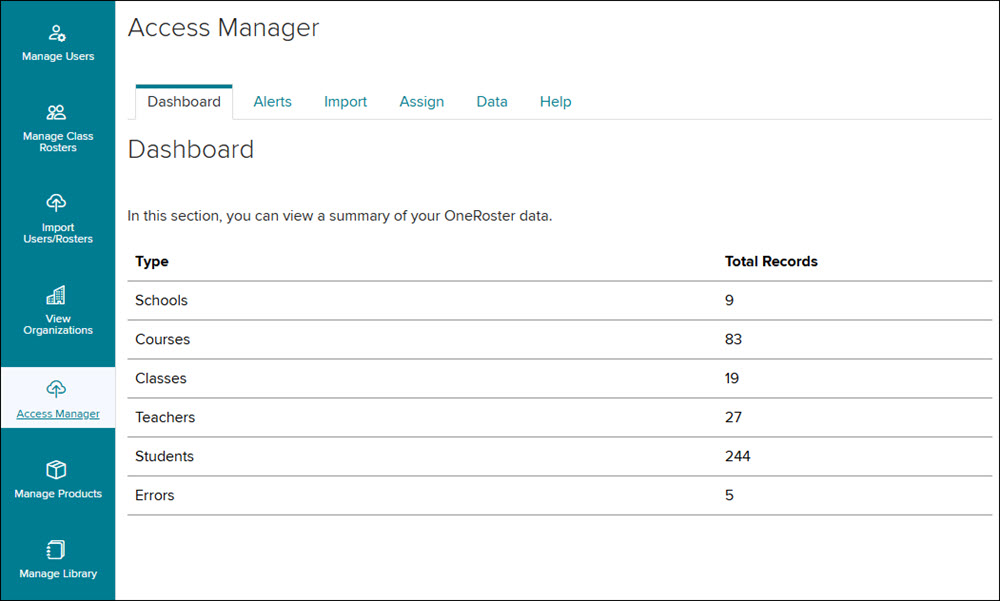
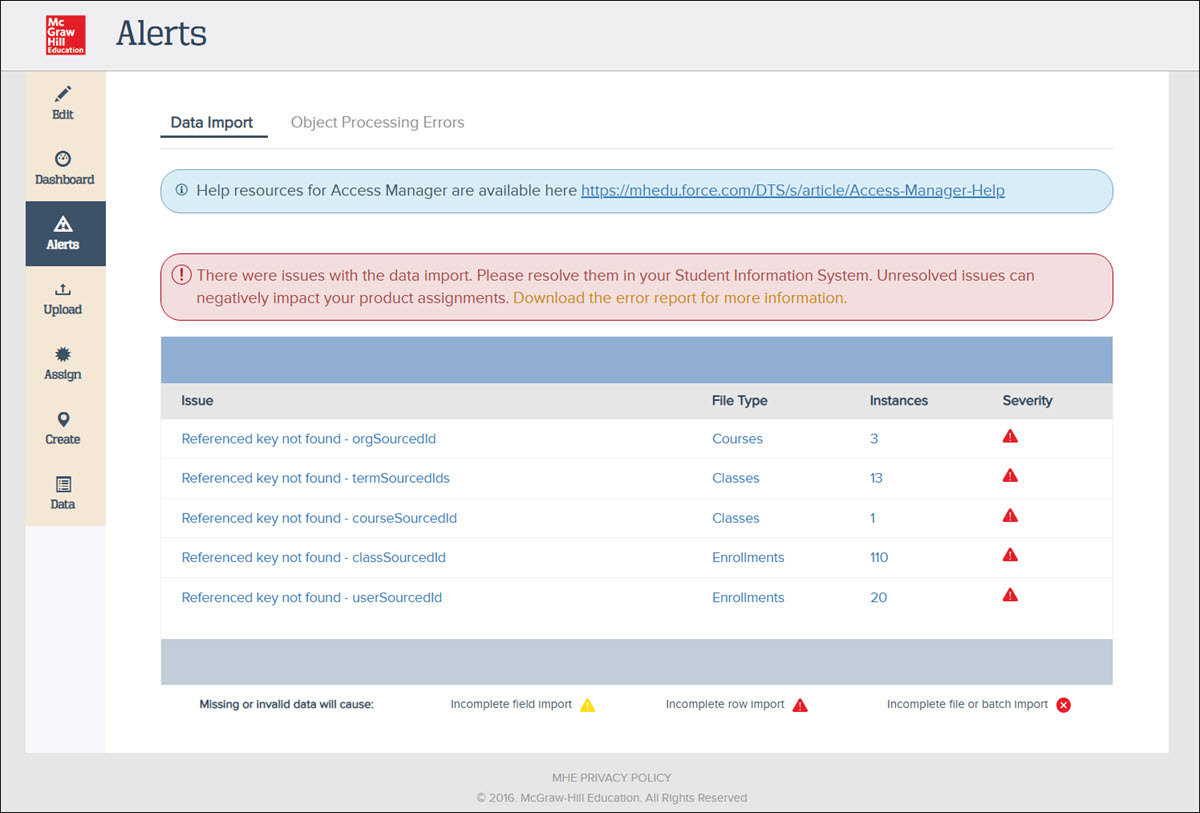
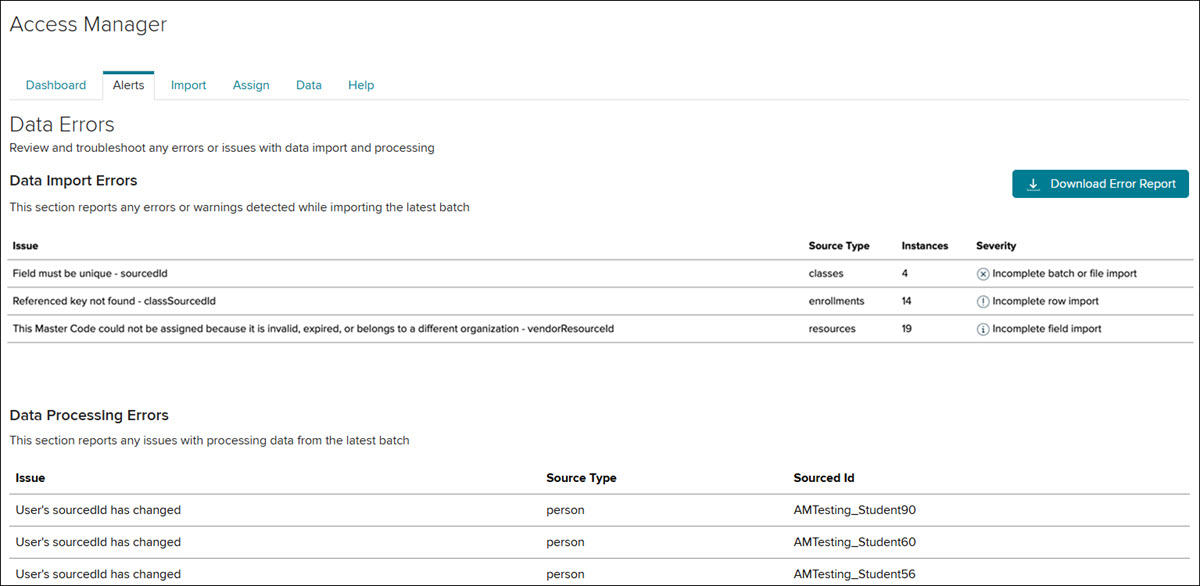
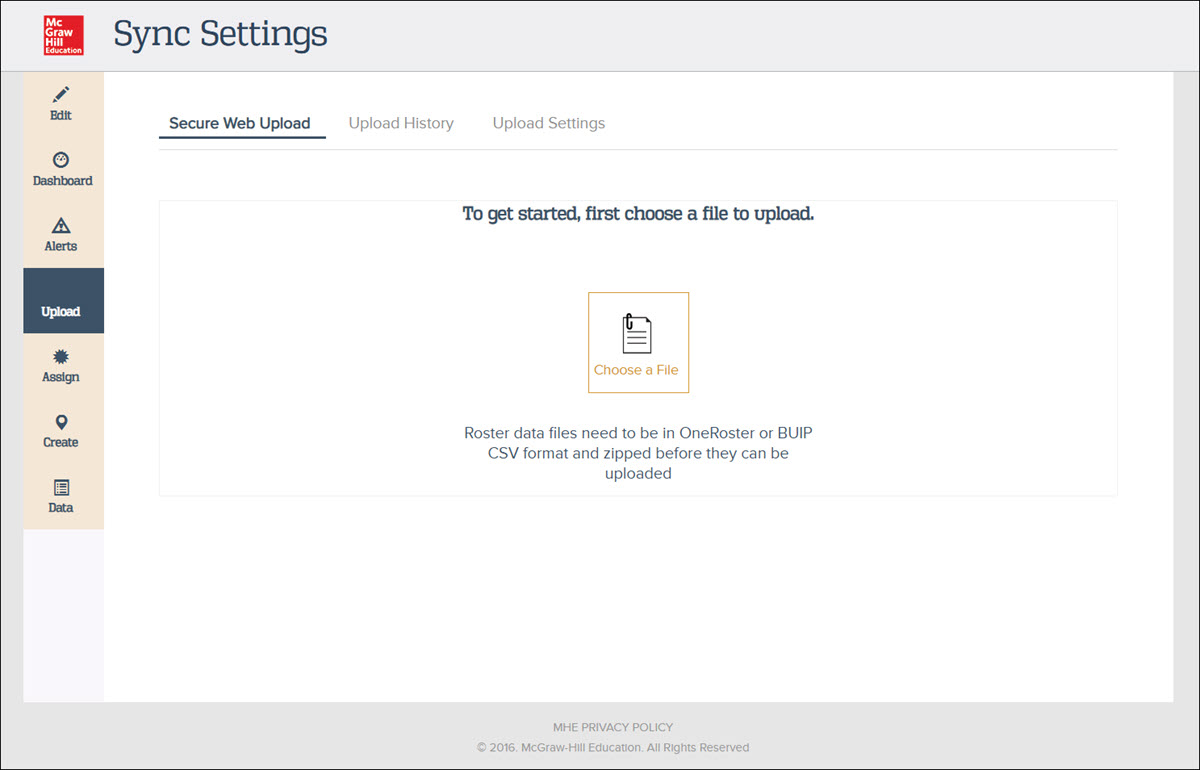
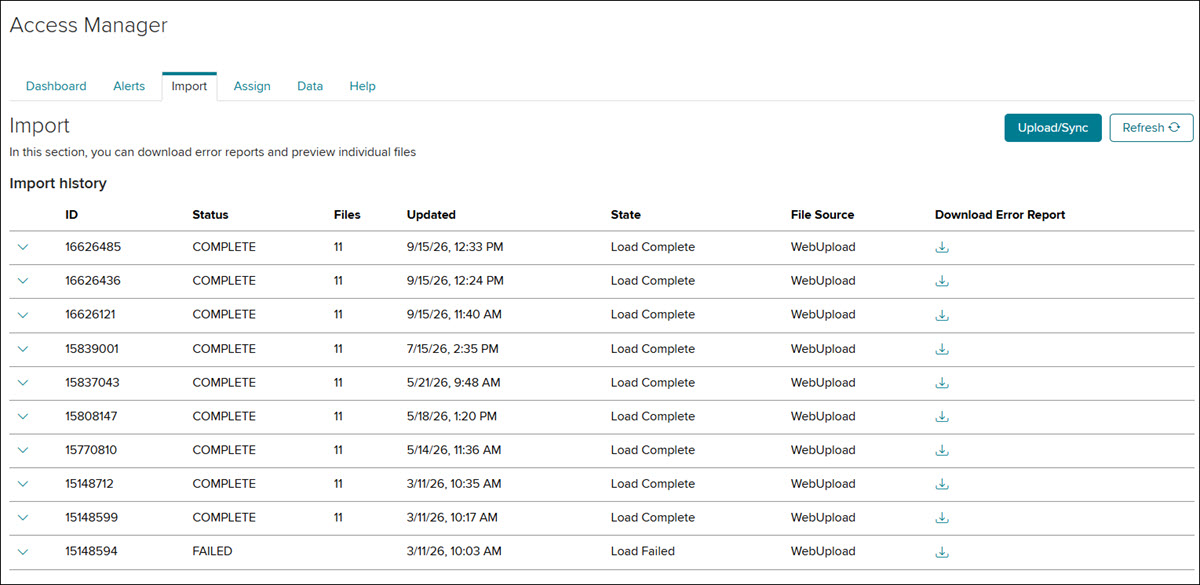
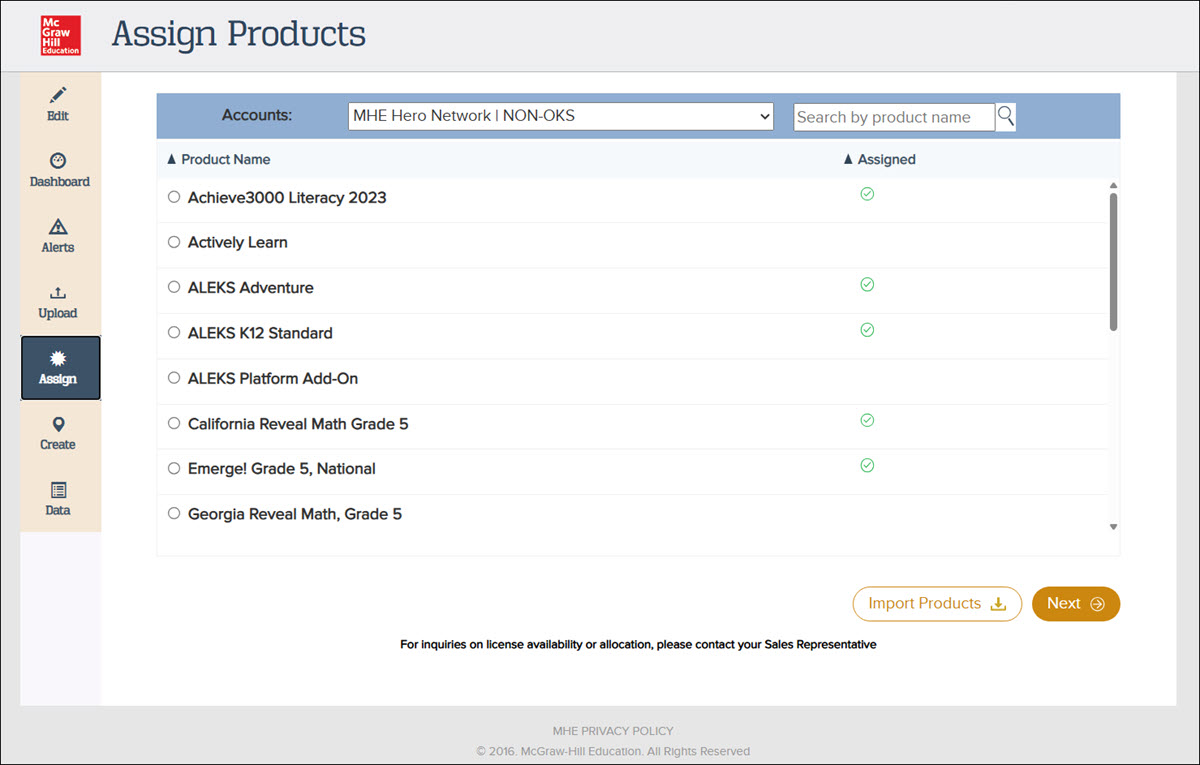
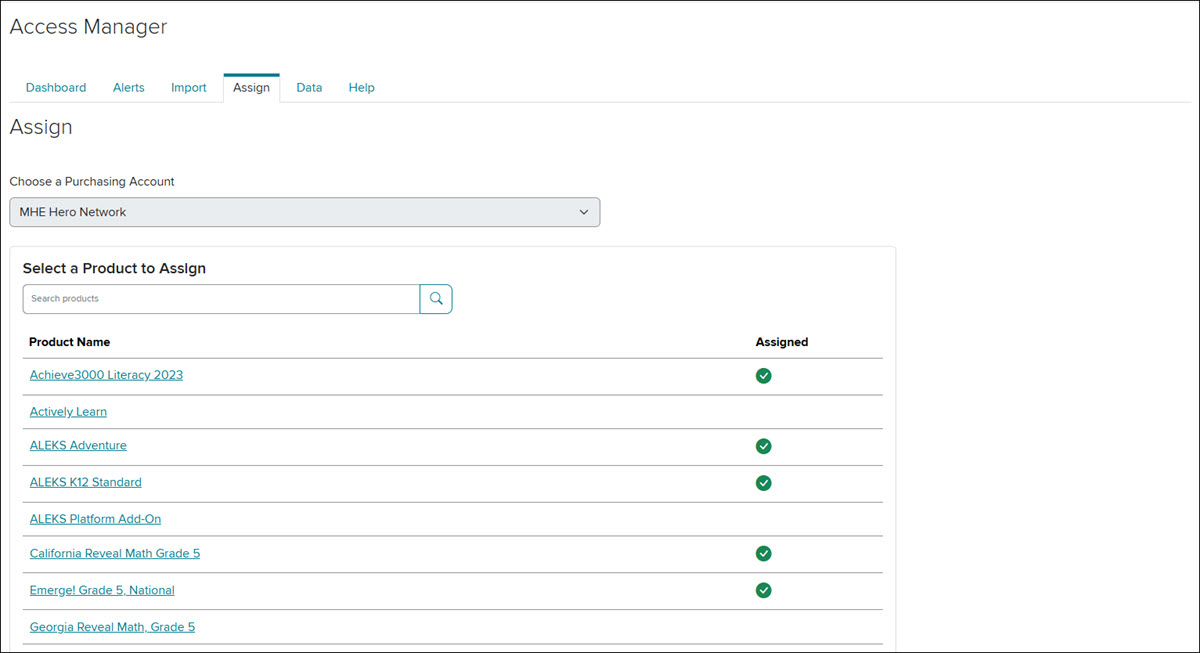
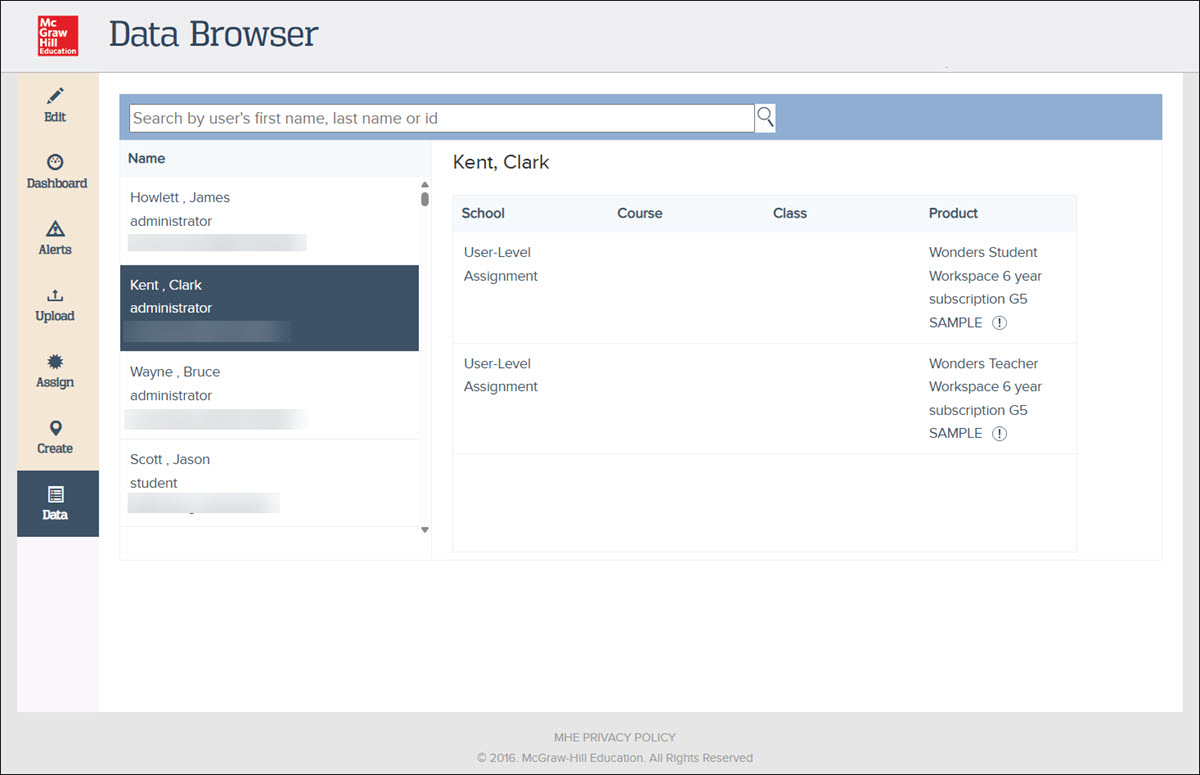
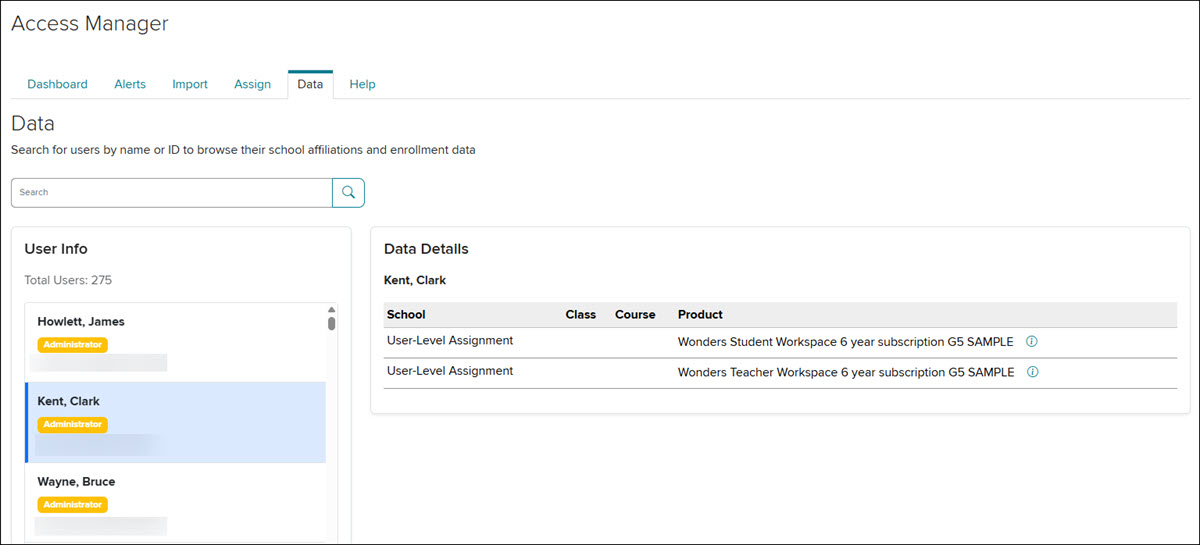
<p>Access Manager is a tool designed for district-level Organization Administrators in auto-rostering districts. Use it to:</p> <ul> <li>View and manage roster data sent to McGraw Hill via API or SFTP</li> <li>Upload roster data</li> <li>Assign content</li> </ul> <p>This article offers a general overview of Access Manager and links to additional support resources.</p> <p> </p> <h2><span class="fs-5">Setup Instructions</span></h2> <p>Your Digital Integration Services team will provide Access Manager instructions when setting up your integration service. During the district onboarding process, please contact your Integration Services representative with any questions or concerns.</p> <p> </p> <h2><span class="fs-5">Account Access</span></h2> <p>District-level Organization Administrators can launch Access Manager from within their administrator tools. If you need an account, a district-level Organization Administrator can create one for you by following the steps in the <a href="https://www.mheducation.com/prek-12/support/knowledge/my-mheducation-com-create-administrator-accounts.html" target="_blank">Create McGraw Hill Administrator Accounts</a> article. <a href="https://www.mheducation.com/prek-12/support.html#admin-contact" target="_blank">Contact the PreK-12 Technical Support team</a> if you're unable to identify someone in your district with this level of access. </p> <p><img src="/content/dam/mhe/support/support-images/dts-k12-images/am-overview/am-overview-1.jpg" data-assetref="am-overview-1-1793109780586"></p> <p> </p> <h2><span class="fs-5">Access Manager Pages</span></h2> <p>Below is a brief description of each Access Manager page and links to resources that provide more information.</p> <p> </p> <h3><span class="fs-5">Alerts</span></h3> <p>The Alerts tab details related to your data imports. If an import fails, you can review the cause of the error and download detailed error reports.</p> <p> </p> <p>The <strong>Data Errors</strong> are also now broken down into two sections - Data Import Errors and Data Processing Errors.</p> <ul> <li><strong>Data Import Errors</strong> - This section reports any errors or warnings detected while importing the latest batch of data.</li> </ul> <ul> <li><strong>Data Processing Errors</strong> - This section reports any issues with processing data from the latest batch.</li> </ul> <p> </p> <h3 class="fs-5">Severity Descriptions</h3> <ul> <li><strong>Incomplete field import</strong> - Indicates an issue with an optional field and will be ignored.</li> </ul> <ul> <li><strong>Incomplete row import</strong> - Indicates an import error for a required field that prevents the entire affected row from being processed.</li> </ul> <ul> <li><strong>Incomplete file or batch import</strong> - Indicates an import error for an entire file or batch and prevents all data in that batch from being processed.</li> </ul> <p> </p> <p>For additional guidance, refer to the <a href="https://www.mheducation.com/prek-12/support/knowledge/access-manager-fixing-common-errors.html" target="_blank">Fixing Common Errors in Access Manager</a> article.</p> <p> </p> <p><strong>Previous Version</strong></p> <p><img src="/content/dam/mhe/support/support-images/dts-k12-images/am-overview/am-overview-3.jpg" data-assetref="am-overview-3-1793110134636"></p> <p> </p> <p><strong>New Version</strong></p> <p><img src="/content/dam/mhe/support/support-images/dts-k12-images/am-overview/am-overview-2.jpg" data-assetref="am-overview-2-1793109994243"></p> <p> </p> <h3 class="fs-5">Import</h3> <p>On the Import tab, you can manually load data files into Access Manager. Make sure to upload the zipped file containing your OneRoster® CSV files.</p> <p><strong>Note:</strong> In the previous version of Access Manager, the Import tab was referred to as the Upload page.</p> <p> </p> <p><strong>Previous Version</strong></p> <p><img src="/content/dam/mhe/support/support-images/dts-k12-images/am-overview/am-overview-4.jpg" data-assetref="am-overview-4-1793110333613"></p> <p> </p> <p><strong>New Version</strong></p> <p><img src="/content/dam/mhe/support/support-images/dts-k12-images/am-overview/am-overview-5.jpg" data-assetref="am-overview-5-1793110339367"></p> <p> </p> <h3><span class="fs-5">Assign</span></h3> <p>The Assign tab shows content assignments for users and schools. If certain content isn't assigned through your roster data, you can manually assign it by course and class. This is typically done by a Curriculum Department member, as they are generally most familiar with McGraw Hill programs. Keep in mind that a district-level Organization Administrator account is required to assign content in Access Manager. For further details, see the <a href="https://www.mheducation.com/prek-12/support/knowledge/assign-content-on-access-manager.html" target="_blank">Manage Content on Access Manager</a> article.</p> <p> </p> <p><strong>Previous Version</strong></p> <p><img src="/content/dam/mhe/support/support-images/dts-k12-images/am-overview/am-overview-6.jpg" data-assetref="am-overview-6-1793110485609"></p> <p> </p> <p><strong>New Version</strong></p> <p><img src="/content/dam/mhe/support/support-images/dts-k12-images/am-overview/am-overview-7.jpg" data-assetref="am-overview-7-1793110491906"></p> <p> </p> <h3><span class="fs-5">Data</span></h3> <p>The Data tab provides you with a view of your processed roster data. You can search for and view users by first name, last name, or ID number. Select a user to view the user’s school affiliation, course names, class names, teacher names, and content assigned.</p> <p> </p> <p><strong>Previous Version</strong></p> <p><img src="/content/dam/mhe/support/support-images/dts-k12-images/am-overview/am-overview-8.jpg" data-assetref="am-overview-8-1793110692694"></p> <p> </p> <p><strong>New Version</strong></p> <p><img src="/content/dam/mhe/support/support-images/dts-k12-images/am-overview/am-overview-9.jpg" data-assetref="am-overview-9-1793113140274"></p> <h5> </h5> <p>OneRoster<sup>®</sup> is a trademark of the IMS Global Learning Consortium, Inc. (<a href="https://www.1edtech.org/" target="_blank">www.imsglobal.org</a>)</p> dts Explore Access Manager tools and resources for managing users, roles, and digital access. 2026-10-27 Access Manager Overview Explore Access Manager tools and resources for managing users, roles, and digital access. Explore Access Manager tools and resources for managing users, roles, and digital access.
Explore Access Manager tools and resources for managing users, roles, and digital access.
Access Manager is a tool designed for district-level Organization Administrators in auto-rostering districts. Use it to: View and manage roster data sent to McGraw Hill via API or SFTP Upload roster data Assign content This article offers a general overview of Access Manager and links to additional support resources. Setup Instructions Your Digital Integration Services team will provide Access Manager instructions when setting up your integration service. During the district onboarding process, please contact your Integration Services representative with any questions or concerns. Account Access District-level Organization Administrators can launch Access Manager from within their administrator tools. If you need an account, a district-level Organization Administrator can create one for you by following the steps in the Create McGraw Hill Administrator Accounts article. Contact the PreK-12 Technical Support team if you're unable to identify someone in your district with this level of access. Access Manager Pages Below is a brief description of each Access Manager page and links to resources that provide more information. Alerts The Alerts tab details related to your data imports. If an import fails, you can review the cause of the error and download detailed error reports. The Data Errors are also now broken down into two sections - Data Import Errors and Data Processing Errors. Data Import Errors - This section reports any errors or warnings detected while importing the latest batch of data. Data Processing Errors - This section reports any issues with processing data from the latest batch. Severity Descriptions Incomplete field import - Indicates an issue with an optional field and will be ignored. Incomplete row import - Indicates an import error for a required field that prevents the entire affected row from being processed. Incomplete file or batch import - Indicates an import error for an entire file or batch and prevents all data in that batch from being processed. For additional guidance, refer to the Fixing Common Errors in Access Manager article. Previous Version New Version Import On the Import tab, you can manually load data files into Access Manager. Make sure to upload the zipped file containing your OneRoster® CSV files. Note: In the previous version of Access Manager, the Import tab was referred to as the Upload page. Previous Version New Version Assign The Assign tab shows content assignments for users and schools. If certain content isn't assigned through your roster data, you can manually assign it by course and class. This is typically done by a Curriculum Department member, as they are generally most familiar with McGraw Hill programs. Keep in mind that a district-level Organization Administrator account is required to assign content in Access Manager. For further details, see the Manage Content on Access Manager article. Previous Version New Version Data The Data tab provides you with a view of your processed roster data. You can search for and view users by first name, last name, or ID number. Select a user to view the user’s school affiliation, course names, class names, teacher names, and content assigned. Previous Version New Version OneRoster® is a trademark of the IMS Global Learning Consortium, Inc. (www.imsglobal.org)
dts
PreK-12, Customer Support, School Administrator, Preschool, Elementary School, Middle School, High School, Direct Login & Auto-Rostering, SSO & Auto-Rostering, Core, Intervention, Supplemental, AP, Honors & Electives, Career & Technical Education, Literacy, Math, Science, Social Studies, Health, Visual & Performing Arts, World Languages, AP Biology, AP Chemistry, AP History & Geography, AP Psychology, AP Economics, AP African American Studies, AP Precalculus, AP Statistics, AP Computer Science, AP Language and Composition, AP Public Speaking, AP Music Theory, 5 Steps to a 5 - AP Test Prep, Glencoe Health 2022, Teen Health 2021, Arrive Math, Building Blocks 2024, Building Blocks PreK 2025, Number Worlds 2024, SRA Reading Laboratory 2025, SRA Reading Mastery Transformations, Achieve3000 Literacy, Actively Learn, McGraw Hill Literacy Emerge!, McGraw Hill Literacy Summit!, McGraw Hill Literacy Soar!, Open Court Reading 2025, Redbird, StudySync 2021, ALEKS, ALEKS Adventure, CA Reveal Math (K-12), Illustrative Math, Redbird Math, Reveal Math (K-12), Texas Math, CA Inspire Science 2020, FL Science 2025 (K-12), Inspire Science 2020, TN Science (K-12), TX Science 2025 (K-12), CA Impact 2019, FL Social Studies 2024 (K-12), Impact Social Studies, McGraw Hill Social Studies, All Sorts 2026 (K-5), Asi se Dice 2024, CTE - Business, Marketing, and Finance, CTE - Health Science, CTE - Computing and Technology, CTE - Agriculture, CTE - Culinary Arts, CTE - Early Childhood Education, CTE - Criminal Justice, Level Up K–5, Level Up 6–8, Level Up 9–12, Glencoe Health 2014, McGraw Hill Health 2014, 2Inform, Building Blocks 2015, Connecting Math Concepts, Number Worlds 2015, Corrective Reading, Early Interventions in Reading, Spelling Mastery, WonderWorks 2022 & 2014, Maravillas 2020 & 2017, OCR Foundational Skills Kit, OCR Word Analysis Kit, Open Court Reading 2016, 2018, 2023, StudySync 2015 & 2017, Wonders, Wonders 2014, Wonders 2023 2020 2017, Wonders Balanced Literacy 2016, Wonders EL 2016, World of Wonders 2017, Core Plus Math 2015, Everyday Mathematics 4 (K-6), Glencoe Algebra 1 2014, Glencoe Algebra 1 2018, Glencoe Algebra 2 2014, Glenoce Algebra 2 2018, Glencoe Math, Glencoe Math Course 1, Glencoe Math Course 2, Glencoe Math Course 3, Glencoe Math Accelerated, McGraw Hill My Math 2013 & 2016, McGraw Hill My Math 2018, McGraw Hill My Math, Pre-Algebra 2012, Glencoe Science 2017, Glencoe Science, Inspire Science 2017, iScience 2017, Networks, Networks 2014 (K-5), Networks 2014 & 2016, Networks 2018, Music! Its Role, Spotlight on Music, Asi se Dice 2016, Access Manager, Account Management, User Management, Products & Licenses