spelling-mastery
connecting-math-concepts
music-its-role
networks
glencoe-math
2inform
glencoe-science
corrective-reading
wonders
early-interventions-in-reading
my-math
ocr-foundational-skills-kit
spotlight-on-music
administrator
Context
Context/Curriculum Type
Context/Curriculum Type/Supplemental
Programs & Solutions
Programs & Solutions/Glencoe Math
Programs & Solutions/Glencoe Math/Glencoe Algebra 1 2014
Programs & Solutions/WonderWorks
Programs & Solutions/WonderWorks/WonderWorks 2022 & 2014
Context/Subject
Context/Subject/Visual & Performing Arts
Context/Education Level
Context/Education Level/High School
Programs & Solutions/Spelling Mastery
Programs & Solutions/Glencoe Math/Glenoce Algebra 2 2018
Programs & Solutions/Wonders
Programs & Solutions/Wonders/Wonders Balanced Literacy 2016
Programs & Solutions/StudySync
Programs & Solutions/StudySync/StudySync 2015 & 2017
Programs & Solutions/Glencoe Math/Glencoe Algebra 1 2018
Programs & Solutions/Networks
Programs & Solutions/Networks/Networks 2018
Context/Integration Type
Context/Integration Type/Direct Login & Auto-Rostering
Programs & Solutions/Connecting Math Concepts
Programs & Solutions/Glencoe Math/Glencoe Math Accelerated
Context/Subject/Math
Programs & Solutions/Open Court Reading
Programs & Solutions/Open Court Reading/Open Court Reading 2016, 2018, 2023
Asset Format Type
Asset Format Type/Customer Support
Programs & Solutions/Building Blocks
Programs & Solutions/Building Blocks/Building Blocks 2015
Business Unit
Business Unit/PreK-12
Programs & Solutions/Glencoe Math/Glencoe Algebra 2 2014
Programs & Solutions/Music! Its Role
Programs & Solutions/McGraw Hill My Math
Programs & Solutions/McGraw Hill My Math/McGraw Hill My Math 2013 & 2016
Programs & Solutions/Wonders/Wonders 2023 2020 2017
Programs & Solutions/Everyday Mathematics
Programs & Solutions/Everyday Mathematics/Everyday Mathematics 4 (K-6)
Programs & Solutions/Glencoe Math/Glencoe Geometry 2014
Programs & Solutions/Maravillas
Programs & Solutions/Maravillas/Maravillas 2020 & 2017
Programs & Solutions/Glencoe Math/Glencoe Geometry 2018
Context/Curriculum Type/Career & Technical Education
Programs & Solutions/World of Wonders
Programs & Solutions/World of Wonders/World of Wonders 2017
Programs & Solutions/Wonders/Wonders EL 2016
Programs & Solutions/iScience
Programs & Solutions/iScience/iScience 2017
Context/Subject/Health
Programs & Solutions/2Inform
Context/Subject/Social Studies
Programs & Solutions/Wonders/Wonders 2014
Personas
Personas/School Educator
Personas/School Educator/School Administrator
Context/Subject/World Languages
Programs & Solutions/Asi Se Dice
Programs & Solutions/Asi Se Dice/Asi se Dice 2016
Context/Subject/Literacy
Context/Education Level/Preschool
Programs & Solutions/McGraw Hill Pre-Algebra
Programs & Solutions/McGraw Hill Pre-Algebra/Pre-Algebra 2012
Programs & Solutions/Glencoe Science
Context/Curriculum Type/Intervention
Programs & Solutions/McGraw Hill Health
Programs & Solutions/McGraw Hill Health/McGraw Hill Health 2014
Programs & Solutions/Corrective Reading
Programs & Solutions/Inspire Science
Programs & Solutions/Inspire Science/Inspire Science 2017
Programs & Solutions/Core Plus Math
Programs & Solutions/Core Plus Math/Core Plus Math 2015
Programs & Solutions/Glencoe Science/Glencoe Science 2017
Context/Curriculum Type/Core
Programs & Solutions/Glencoe Health
Programs & Solutions/Glencoe Health/Glencoe Health 2014
Context/Education Level/Middle School
Context/Integration Type/SSO & Manual-Rostering
Support Topics
Support Topics/User Guides & Account Management
Support Topics/User Guides & Account Management/Products & Licenses
Programs & Solutions/Glencoe Math/Glencoe Math Course 1
Programs & Solutions/Glencoe Math/Glencoe Math Course 2
Programs & Solutions/Glencoe Math/Glencoe Math Course 3
Programs & Solutions/Networks/Networks 2014 & 2016
Context/Subject/Science
Support Topics/User Guides & Account Management/Account Management
Context/Integration Type/SSO & Auto-Rostering
Programs & Solutions/Open Court Reading/OCR Word Analysis Kit
Context/Curriculum Type/AP, Honors & Electives
Context/Education Level/Elementary School
Programs & Solutions/Early Interventions in Reading
Programs & Solutions/McGraw Hill My Math/McGraw Hill My Math 2018
Programs & Solutions/Number Worlds
Programs & Solutions/Number Worlds/Number Worlds 2015
Context/Integration Type/Direct Login & Manual-Rostering
Programs & Solutions/OCR Foundational Skills Kit
Programs & Solutions/Networks/Networks 2014 (K-5)
Programs & Solutions/Spotlight on Music
prek-12
2026-03-24T18:39:32.164-03:00
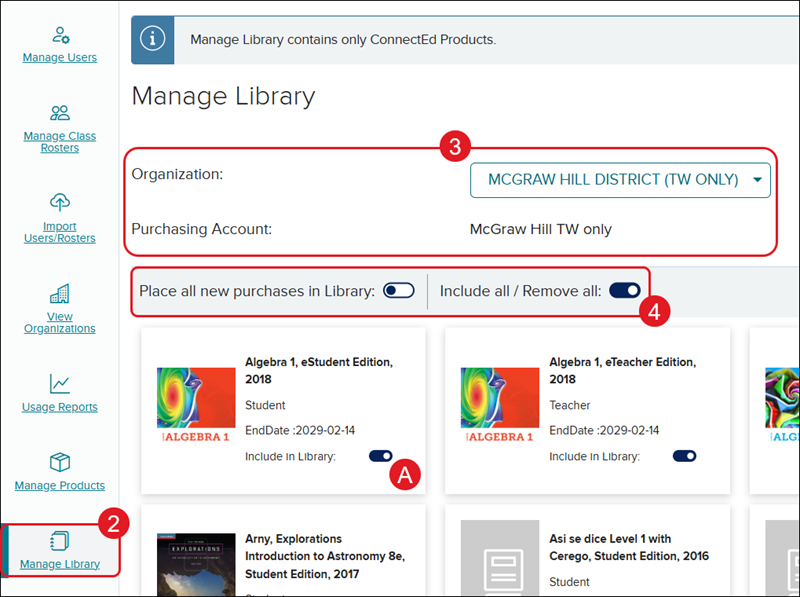
<p><a href="https://hub.mheducation.com/share/jwqgpx6519ew" target="_blank">View the demo in a separate tab.</a></p> <p><a href="https://hub.mheducation.com/share/c8zrdbfjgi27" target="_blank">View the Spanish version of the demo.</a></p> <p> </p> <p>Teachers can <a href="https://mh.my.site.com/DTS/s/article/ConnectED-How-do-I-Redeem-a-Master-Code?dc=Getting_Started_Teacher" target="_blank">redeem content using Master Codes</a> provided by an Administrator, or they can self-select ConnectED products from the <a href="https://mh.my.site.com/DTS/s/article/How-to-use-the-ConnectED-Library?dc=Getting_Started_Teacher" target="_blank">Available Product Library</a>. Allowing teachers access to the ConnectED program Library is the easiest form of distribution.</p> <p>If you decide to have teachers self-select content from the Library, you will need to first set up the ConnectED Product Library from <strong>Manage Library</strong> in your administrator tools.</p> <p> </p> <p>1. SSO or log into your Administrator account at <a href="https://my.mheducation.com/login" target="_blank">my.mheducation.com</a>.</p> <p>If you have both a Teacher role and Administrator role, you will need to <a href="/content/mheducation/us/en/prek-12/support/knowledge/how-to-toggle-between-roles-and-orgs" target="_blank">toggle over to your Administrator role</a> to access the administrator tools.</p> <p>2. Click on <strong>Manage Library</strong> from the navigation menu.<strong></strong></p> <p>If the Library is turned off for the purchasing account, you will get the message: <em>The selected account does not have the Manage Library feature enabled.</em> <a href="https://www.mheducation.com/prek-12/support.html#admin-contact" target="_blank">Contact PreK-12 Technical Support</a> if you would like to enable this feature.</p> <p>If you are not the Organization Administrator with access to the purchasing account, you will get the message: <em>There is no purchasing account associated with this organization. </em>You will need to contact a district-level administrator with access to the purchasing account. They can either set up the ConnectED Library or <a href="/content/mheducation/us/en/prek-12/support/knowledge/open-learning-environment-how-to-add-roles-to-an-existing-user" target="_blank">update your account with access</a> to make changes at the district level.</p> <p>3. If assigned to more than one purchasing account, select the <strong>Organization </strong>and <strong>Purchasing Account</strong> from the drop-downs.</p> <p>4. Click the toggle on/off for the provided options: <strong>Place all new purchases in Library</strong> and <strong>Include all/Remove all</strong>.</p> <p>A. You also have the option to toggle on/off individual programs.</p> <p>Selected settings will automatically save.</p> <p><img src="/content/dam/mhe/support/support-images/migrated/rtaImage-1999323589.jpeg" data-assetref="rtaImage-1999323589-1779218868940"></p> dts Admin Tools Manage Library: step-by-step guidance, requirements, and tips to help you complete this task successfully. 2025-11-20 Manage the ConnectED Product Library Admin Tools Manage Library: step-by-step guidance, requirements, and tips to help you complete this task successfully. Use administrator tools to manage the digital library and available resources.
Use administrator tools to manage the digital library and available resources.
View the demo in a separate tab. View the Spanish version of the demo. Teachers can redeem content using Master Codes provided by an Administrator, or they can self-select ConnectED products from the Available Product Library. Allowing teachers access to the ConnectED program Library is the easiest form of distribution. If you decide to have teachers self-select content from the Library, you will need to first set up the ConnectED Product Library from Manage Library in your administrator tools. 1. SSO or log into your Administrator account at my.mheducation.com. If you have both a Teacher role and Administrator role, you will need to toggle over to your Administrator role to access the administrator tools. 2. Click on Manage Library from the navigation menu. If the Library is turned off for the purchasing account, you will get the message: The selected account does not have the Manage Library feature enabled. Contact PreK-12 Technical Support if you would like to enable this feature. If you are not the Organization Administrator with access to the purchasing account, you will get the message: There is no purchasing account associated with this organization. You will need to contact a district-level administrator with access to the purchasing account. They can either set up the ConnectED Library or update your account with access to make changes at the district level. 3. If assigned to more than one purchasing account, select the Organization and Purchasing Account from the drop-downs. 4. Click the toggle on/off for the provided options: Place all new purchases in Library and Include all/Remove all. A. You also have the option to toggle on/off individual programs. Selected settings will automatically save.
dts
Customer Support, PreK-12, School Administrator, Preschool, Elementary School, Middle School, High School, Direct Login & Auto-Rostering, Direct Login & Manual-Rostering, SSO & Auto-Rostering, SSO & Manual-Rostering, Core, Intervention, Supplemental, AP, Honors & Electives, Career & Technical Education, Literacy, Math, Science, Social Studies, Health, Visual & Performing Arts, World Languages, Glencoe Health 2014, McGraw Hill Health 2014, 2Inform, Building Blocks 2015, Connecting Math Concepts, Number Worlds 2015, Corrective Reading, Early Interventions in Reading, Spelling Mastery, WonderWorks 2022 & 2014, Maravillas 2020 & 2017, OCR Foundational Skills Kit, OCR Word Analysis Kit, Open Court Reading 2016, 2018, 2023, StudySync 2015 & 2017, Wonders, Wonders 2014, Wonders 2023 2020 2017, Wonders Balanced Literacy 2016, Wonders EL 2016, World of Wonders 2017, Core Plus Math 2015, Everyday Mathematics 4 (K-6), Glencoe Algebra 1 2014, Glencoe Algebra 1 2018, Glencoe Algebra 2 2014, Glenoce Algebra 2 2018, Glencoe Math, Glencoe Geometry 2014, Glencoe Geometry 2018, Glencoe Math Course 1, Glencoe Math Course 2, Glencoe Math Course 3, Glencoe Math Accelerated, McGraw Hill My Math, McGraw Hill My Math 2013 & 2016, McGraw Hill My Math 2018, Pre-Algebra 2012, Glencoe Science 2017, Glencoe Science, Inspire Science 2017, iScience 2017, Networks, Networks 2014 (K-5), Networks 2014 & 2016, Networks 2018, Music! Its Role, Spotlight on Music, Asi se Dice 2016, Products & Licenses, Account Management