illustrative-math
impact
arrive-math
5-steps-to-a-5-test-prep
music-its-role
open-court-reading
mh-social-studies
ocr-foundational-skills-kit
spotlight-on-music
reveal-math
Programs & Solutions
Programs & Solutions/Impact Social Studies
Programs & Solutions/Impact Social Studies/CA Impact 2019
Support Topics
Support Topics/Assessments & Reporting
Support Topics/Assessments & Reporting/Online Assessments
Programs & Solutions/Reading Mastery
Programs & Solutions/Reading Mastery/SRA Reading Mastery Transformations
Context
Context/Curriculum Type
Context/Curriculum Type/Supplemental
Programs & Solutions/Open Court Reading
Programs & Solutions/Open Court Reading/Open Court Reading 2025
Programs & Solutions/Illustrative Math
Context/Subject
Context/Subject/Visual & Performing Arts
Context/Education Level
Context/Education Level/High School
Programs & Solutions/AP Edition
Programs & Solutions/AP Edition/AP Computer Science
Programs & Solutions/Teen Health
Programs & Solutions/Teen Health/Teen Health 2021
Programs & Solutions/AP Edition/AP Biology
Programs & Solutions/AP Edition/AP Chemistry
Programs & Solutions/Wonders
Programs & Solutions/Wonders/Wonders Balanced Literacy 2016
Programs & Solutions/Networks
Programs & Solutions/Networks/Networks 2018
Programs & Solutions/Arrive Math
Context/Integration Type
Context/Integration Type/Direct Login & Auto-Rostering
Programs & Solutions/Inspire Science
Programs & Solutions/Inspire Science/CA Inspire Science 2020
Programs & Solutions/5 Steps to a 5 - AP Test Prep
Programs & Solutions/Level Up
Programs & Solutions/Level Up/Level Up 9–12
Programs & Solutions/McGraw Hill Math
Programs & Solutions/McGraw Hill Math/Texas Math
Programs & Solutions/Open Court Reading/Open Court Reading 2016, 2018, 2023
Context/Subject/Math
Asset Format Type
Asset Format Type/Customer Support
Business Unit
Business Unit/PreK-12
Programs & Solutions/Building Blocks
Programs & Solutions/Building Blocks/Building Blocks PreK 2025
Programs & Solutions/McGraw Hill CTE
Programs & Solutions/McGraw Hill CTE/CTE - Early Childhood Education
Programs & Solutions/Music! Its Role
Programs & Solutions/Wonders/Wonders 2023 2020 2017
Programs & Solutions/AP Edition/AP History & Geography
Programs & Solutions/Everyday Mathematics
Programs & Solutions/Everyday Mathematics/Everyday Mathematics 4 (K-6)
Programs & Solutions/Reading Laboratory
Programs & Solutions/Reading Laboratory/SRA Reading Laboratory 2025
Programs & Solutions/AP Edition/AP Music Theory
Programs & Solutions/Maravillas
Programs & Solutions/Maravillas/Maravillas 2020 & 2017
Context/Curriculum Type/Career & Technical Education
Programs & Solutions/McGraw Hill CTE/CTE - Business, Marketing, and Finance
Programs & Solutions/McGraw Hill CTE/CTE - Computing and Technology
Programs & Solutions/McGraw Hill Social Studies
Programs & Solutions/McGraw Hill Social Studies/FL Social Studies 2024 (K-12)
Programs & Solutions/McGraw Hill CTE/CTE - Criminal Justice
Programs & Solutions/McGraw Hill Literacy
Programs & Solutions/McGraw Hill Literacy/McGraw Hill Literacy Soar!
Programs & Solutions/Glencoe Health
Programs & Solutions/Glencoe Health/Glencoe Health 2022
Support Topics/Assessments & Reporting/Grades & Assignments
Context/Subject/Health
Context/Subject/Social Studies
Context/Subject/World Languages
Programs & Solutions/Level Up/Level Up 6–8
Context/Subject/Literacy
Personas
Personas/School Educator
Personas/School Educator/Classroom Teacher
Context/Education Level/Preschool
Programs & Solutions/Reveal Math (K-12)
Programs & Solutions/Reveal Math (K-12)/CA Reveal Math (K-12)
Programs & Solutions/McGraw Hill Science
Programs & Solutions/McGraw Hill Science/TX Science 2025 (K-12)
Programs & Solutions/AP Edition/AP Economics
Context/Curriculum Type/Intervention
Programs & Solutions/Level Up/Level Up K–5
Programs & Solutions/Inspire Science/Inspire Science 2020
Programs & Solutions/AP Edition/AP African American Studies
Programs & Solutions/McGraw Hill Science/FL Science 2025 (K-12)
Programs & Solutions/McGraw Hill Literacy/McGraw Hill Literacy Emerge!
Programs & Solutions/McGraw Hill Literacy/McGraw Hill Literacy Summit!
Context/Curriculum Type/Core
Context/Education Level/Middle School
Context/Integration Type/SSO & Manual-Rostering
Programs & Solutions/McGraw Hill CTE/CTE - Agriculture
Programs & Solutions/AP Edition/AP Psychology
Programs & Solutions/Number Worlds
Programs & Solutions/Number Worlds/Number Worlds 2024
Programs & Solutions/AP Edition/AP Public Speaking
Context/Subject/Science
Programs & Solutions/Asi Se Dice
Programs & Solutions/Asi Se Dice/Asi se Dice 2024
Context/Integration Type/SSO & Auto-Rostering
Programs & Solutions/Open Court Reading/OCR Word Analysis Kit
Context/Curriculum Type/AP, Honors & Electives
Programs & Solutions/McGraw Hill CTE/CTE - Health Science
Context/Education Level/Elementary School
Programs & Solutions/McGraw Hill My Math
Programs & Solutions/McGraw Hill My Math/McGraw Hill My Math 2018
Context/Integration Type/Direct Login & Manual-Rostering
Programs & Solutions/OCR Foundational Skills Kit
Programs & Solutions/AP Edition/AP Language and Composition
Programs & Solutions/McGraw Hill Science/TN Science (K-12)
Programs & Solutions/AP Edition/AP Statistics
Programs & Solutions/AP Edition/AP Precalculus
Programs & Solutions/McGraw Hill CTE/CTE - Culinary Arts
Programs & Solutions/Spotlight on Music
Programs & Solutions/Building Blocks/Building Blocks 2024
prek-12
2026-03-24T19:08:51.617-03:00
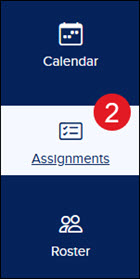
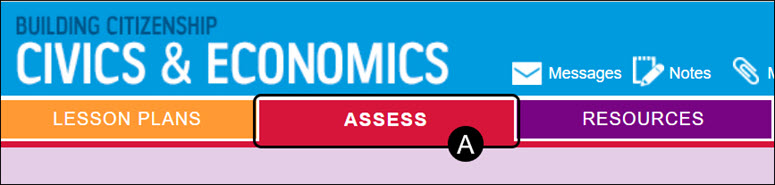
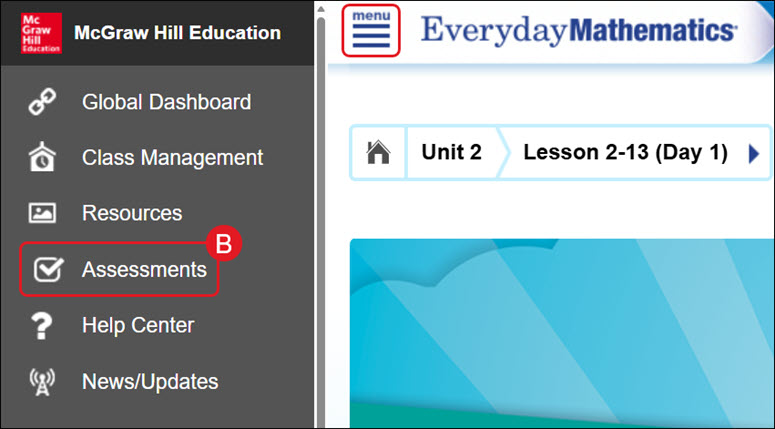
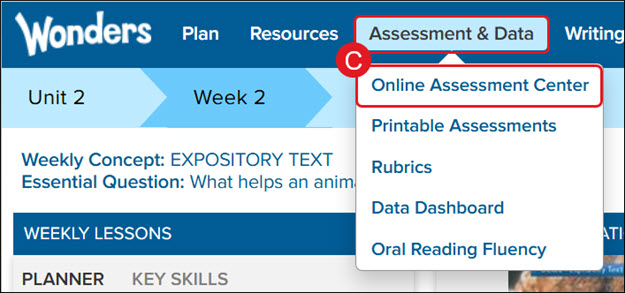
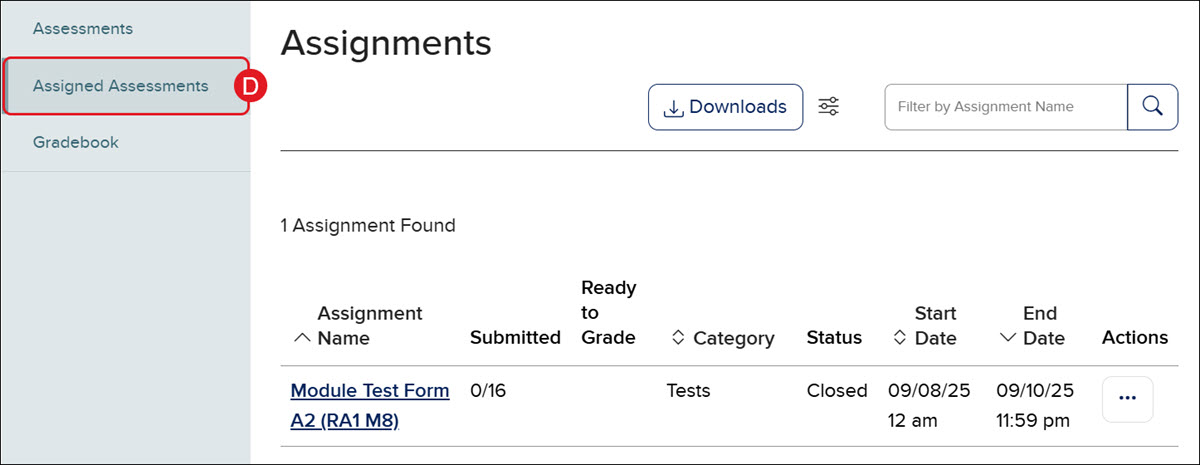
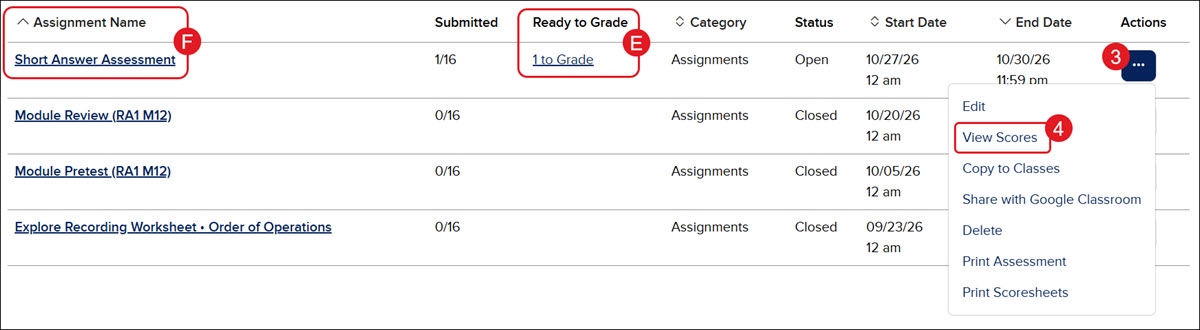
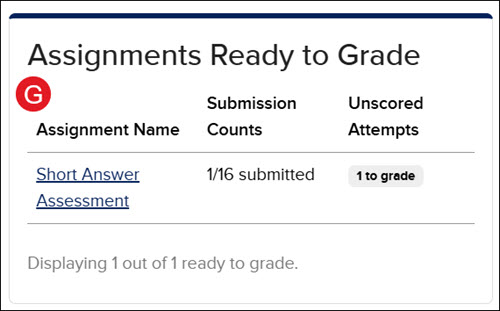
<p><a href="https://hub.mheducation.com/share/tmuujhizyt0m" target="_blank">View the demo in a separate tab.</a></p> <p><a href="https://hub.mheducation.com/share/j4d5vaponmqf" target="_blank">View the Spanish version of the demo.</a></p> <p> </p> <p>With online assessments, when they include certain question types such as essay or short-answer questions, these require you to manually score those questions. For more information on question types, refer to the <a href="https://www.mheducation.com/prek-12/support/knowledge/question-types-overview.html" target="_blank">Available Question Types for McGraw Hill Assessments</a> article.</p> <p>An alternative option to these steps would be to use the Class Scoresheet. See the <a href="https://www.mheducation.com/prek-12/support/knowledge/mh-assess---class-scoresheet.html" target="_blank">Score a McGraw Hill Assessment Using the Class Scoresheet</a> article for more information.</p> <p>For additional McGraw Hill Assess resources, see the <a href="https://www.mheducation.com/prek-12/support/knowledge/open-learning-platform-assessment-management.html" target="_blank">McGraw Hill Assessment Management Resources</a> article.</p> <p> </p> <ol> <li>Launch your course.<br> <br> </li> <li>Click <strong>Assignments </strong>from the navigation menu.<br> <br> <img src="/content/dam/mhe/support/support-images/dts-k12-images/manually-score-mh-assessments/score-mh-assessments-1.jpg" data-assetref="score-mh-assessments-1-1793126535914"><br> <br> For certain programs such as Networks and <em>Wonders</em>, you will need to click on <strong>Assess </strong>(A), <strong>Assessments </strong>(B), or <strong>Online Assessment Center</strong> (C), and then click on <strong>Assignment Assessments</strong> (D).<br> <br> <img src="/content/dam/mhe/support/support-images/dts-k12-images/manually-score-mh-assessments/score-mh-assessments-2.jpg" data-assetref="score-mh-assessments-2-1793126665563"><br> <br> <img src="/content/dam/mhe/support/support-images/dts-k12-images/manually-score-mh-assessments/score-mh-assessments-3.jpg" data-assetref="score-mh-assessments-3-1793126671475"><br> <br> <img src="/content/dam/mhe/support/support-images/dts-k12-images/manually-score-mh-assessments/score-mh-assessments-4.jpg" data-assetref="score-mh-assessments-4-1793126679434"><br> <br> <img src="/content/dam/mhe/support/support-images/dts-k12-images/manually-score-mh-assessments/score-mh-assessments-5.jpg" data-assetref="score-mh-assessments-5-1793126715612"><br> <br> </li> <li>Click on the <strong>Options </strong>button in the <strong>Actions </strong>column.<br> <br> </li> <li>Click <strong>View Scores</strong> from the menu.<br> <br> E. Another option is to click on the <strong>Ready to Grade</strong> link.<br> <br> F. You can also click on the <strong>Assignment Name</strong>.<br> <br> <img src="/content/dam/mhe/support/support-images/dts-k12-images/manually-score-mh-assessments/score-mh-assessments-6.jpg" data-assetref="score-mh-assessments-6-1793127462840"><br> <br> G. Some <strong>Open Learning</strong> courses also have the <strong>Assignments Ready to Grade</strong> option available on the <strong>Dashboard</strong>. Click on the <strong>Assignment Name </strong>to navigate to the assignment.<br> <br> <img src="/content/dam/mhe/support/support-images/dts-k12-images/manually-score-mh-assessments/score-mh-assessments-7.jpg" data-assetref="score-mh-assessments-7-1793127469068"><br> <br> </li> <li>Click on the <strong>View Scoresheet</strong> link in the <strong>Student Work</strong> column.<br> <br> <img src="/content/dam/mhe/support/support-images/dts-k12-images/manually-score-mh-assessments/score-mh-assessments-8.jpg" data-assetref="score-mh-assessments-8-1793128173532"><br> <br> </li> <li>Click on any question or click the <strong>Pending</strong> filter option to view only those that need to be scored.<br> <br> H. Click on the back-and-forth arrows or select a <strong>Student </strong>from the drop-down to navigate between student scoresheets.<br> <br> <img src="/content/dam/mhe/support/support-images/dts-k12-images/manually-score-mh-assessments/score-mh-assessments-9.jpg" data-assetref="score-mh-assessments-9-1793128405596"><br> <br> </li> <li>Enter a <strong>Score</strong> in the provided field. The entered score will auto-save when you click out of the field.<br> <br> I. Enter any <strong>Comments </strong>you want the student to be able to view for the question.<br> <br> J. Click on the <strong>Question Attempt</strong> drop-down to view the different attempts at the question if more than one was available.<br> <br> K. Click the <strong>View Passage</strong> button to view the passage the student read to answer the question (if applicable).<br> <br> L. Click the <strong>Example Response</strong> blade to expand the section. This would need to have been <a href="https://www.mheducation.com/prek-12/support/knowledge/mh-assess-create-and-edit-questions" target="_blank">added to the question</a> before the assessment was assigned.<br> <br> M. Click the <strong>Next Question</strong> link at the bottom to navigate to the following question in the assessment.<br> <br> <img src="/content/dam/mhe/support/support-images/dts-k12-images/manually-score-mh-assessments/score-mh-assessments-10.jpg" data-assetref="score-mh-assessments-10-1793128934327"><br> <br> N. Click the <strong>Export </strong>button to export the currently viewed scoresheet.<br> <br> O. Click the <strong>Close</strong> button to return to the assignment page.<br> <br> <img src="/content/dam/mhe/support/support-images/dts-k12-images/manually-score-mh-assessments/score-mh-assessments-11.jpg" data-assetref="score-mh-assessments-11-1793129068874"></li> </ol> dts Learn how grading works in the platform, including where to view results and common grading workflows. 2026-10-27 Manually Grade McGraw Hill Assessments Learn how grading works in the platform, including where to view results and common grading workflows. Learn how grading works in the platform, including where to view results and common grading workflows.
Learn how grading works in the platform, including where to view results and common grading workflows.
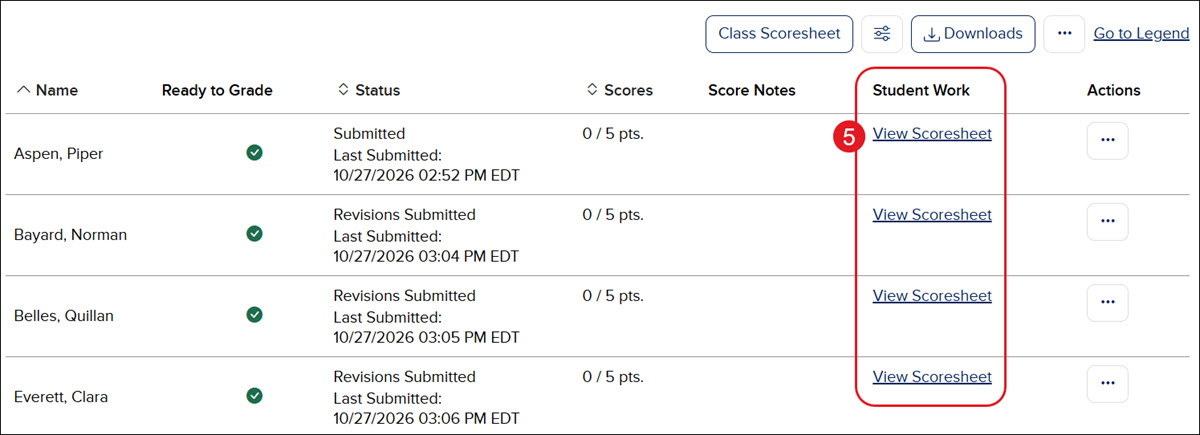
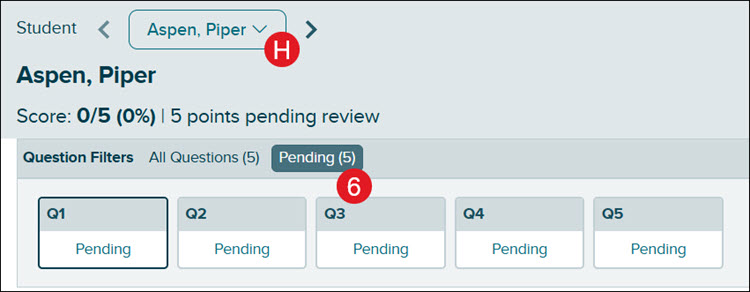
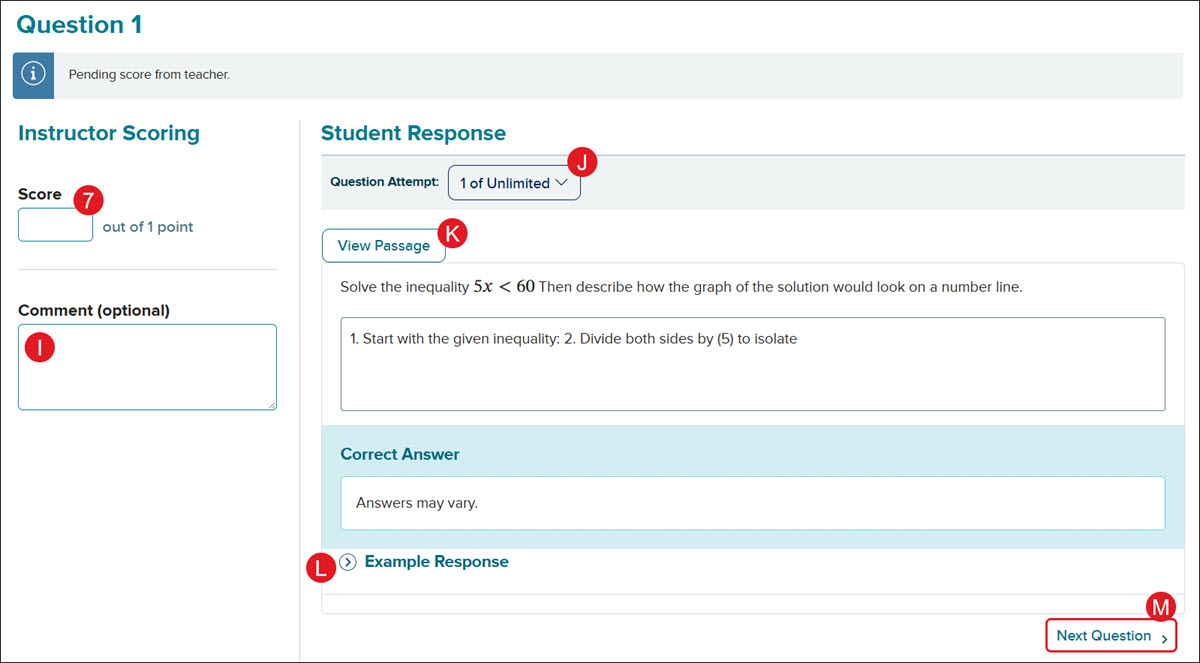
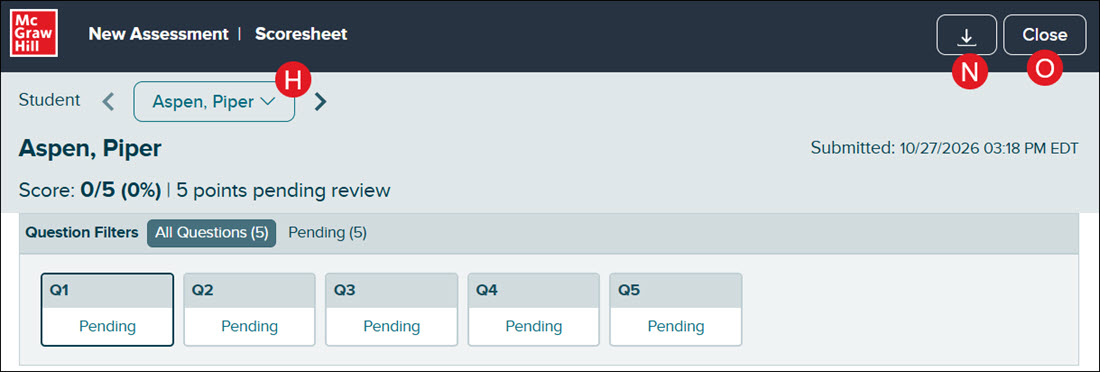
View the demo in a separate tab. View the Spanish version of the demo. With online assessments, when they include certain question types such as essay or short-answer questions, these require you to manually score those questions. For more information on question types, refer to the Available Question Types for McGraw Hill Assessments article. An alternative option to these steps would be to use the Class Scoresheet. See the Score a McGraw Hill Assessment Using the Class Scoresheet article for more information. For additional McGraw Hill Assess resources, see the McGraw Hill Assessment Management Resources article. Launch your course. Click Assignments from the navigation menu. For certain programs such as Networks and Wonders, you will need to click on Assess (A), Assessments (B), or Online Assessment Center (C), and then click on Assignment Assessments (D). Click on the Options button in the Actions column. Click View Scores from the menu. E. Another option is to click on the Ready to Grade link. F. You can also click on the Assignment Name. G. Some Open Learning courses also have the Assignments Ready to Grade option available on the Dashboard. Click on the Assignment Name to navigate to the assignment. Click on the View Scoresheet link in the Student Work column. Click on any question or click the Pending filter option to view only those that need to be scored. H. Click on the back-and-forth arrows or select a Student from the drop-down to navigate between student scoresheets. Enter a Score in the provided field. The entered score will auto-save when you click out of the field. I. Enter any Comments you want the student to be able to view for the question. J. Click on the Question Attempt drop-down to view the different attempts at the question if more than one was available. K. Click the View Passage button to view the passage the student read to answer the question (if applicable). L. Click the Example Response blade to expand the section. This would need to have been added to the question before the assessment was assigned. M. Click the Next Question link at the bottom to navigate to the following question in the assessment. N. Click the Export button to export the currently viewed scoresheet. O. Click the Close button to return to the assignment page.
dts
Customer Support, PreK-12, Classroom Teacher, Preschool, Elementary School, Middle School, High School, Direct Login & Auto-Rostering, Direct Login & Manual-Rostering, SSO & Auto-Rostering, SSO & Manual-Rostering, Core, Intervention, Supplemental, AP, Honors & Electives, Career & Technical Education, Literacy, Math, Science, Social Studies, Health, Visual & Performing Arts, World Languages, AP Biology, AP Chemistry, AP History & Geography, AP Psychology, AP Economics, AP African American Studies, AP Precalculus, AP Statistics, AP Computer Science, AP Language and Composition, AP Public Speaking, AP Music Theory, 5 Steps to a 5 - AP Test Prep, Glencoe Health 2022, Teen Health 2021, Arrive Math, Building Blocks 2024, Building Blocks PreK 2025, Number Worlds 2024, SRA Reading Laboratory 2025, SRA Reading Mastery Transformations, McGraw Hill Literacy Emerge!, McGraw Hill Literacy Summit!, McGraw Hill Literacy Soar!, Open Court Reading, Open Court Reading 2016, 2018, 2023, Open Court Reading 2025, CA Reveal Math (K-12), Illustrative Math, Reveal Math (K-12), Texas Math, CA Inspire Science 2020, FL Science 2025 (K-12), Inspire Science 2020, TN Science (K-12), TX Science 2025 (K-12), CA Impact 2019, FL Social Studies 2024 (K-12), Impact Social Studies, McGraw Hill Social Studies, Asi se Dice 2024, Wonders Balanced Literacy 2016, Maravillas 2020 & 2017, Music! Its Role, McGraw Hill My Math 2018, Networks 2018, OCR Foundational Skills Kit, OCR Word Analysis Kit, Spotlight on Music, Wonders 2023 2020 2017, CTE - Business, Marketing, and Finance, CTE - Health Science, CTE - Computing and Technology, CTE - Agriculture, CTE - Culinary Arts, CTE - Early Childhood Education, CTE - Criminal Justice, Level Up K–5, Level Up 6–8, Level Up 9–12, Everyday Mathematics 4 (K-6), Grades & Assignments, Online Assessments